

If you’re here because your Macbook screen is cracked, flickering, showing lines, or has that annoying stagelight glow at the bottom — here’s the short version:
- Most Macbook screen problems can be fixed by replacing just the LCD panel — not the entire display assembly. This saves you a significant amount of money.
- Dented display panels are the exception. If the aluminium housing is physically bent or dented, LCD-only replacement won’t work — you’ll need a full display assembly replacement.
- Your data is completely safe during a screen replacement. We don’t touch your storage or operating system.
- FREE diagnosis at KissMyMac®. We’ll tell you exactly what’s wrong, what it costs, and whether it’s LCD-only or full assembly — before you commit to anything.
At KissMyMac®, we’re an Apple Certified Independent Repair Provider specialising in Macbook screen replacement Malaysia. Over 10 years of experience. Genuine Apple parts. No Fix, No Pay guarantee.
WhatsApp us for a free assessment — or keep reading for the full breakdown.
The 7 Most Common Macbook Screen Problems We See
Based on what we encountered so far at KissMyMac®, these are the screen issues that walk through our doors most frequently. Some are straightforward. Some are misunderstood. All of them are fixable — but the approach (and cost) depends on what’s actually going on.
1. Cracked or Shattered Screen
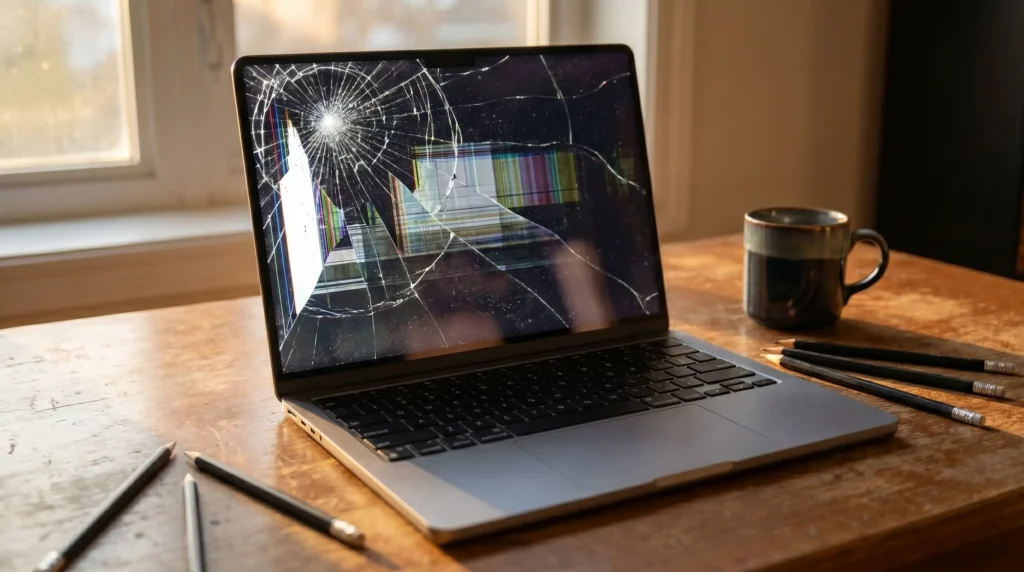
This is our Number 1 most encountered screen issue. And based on our experience, 50% of the Macbook screen crack cases are due to drops. Another 20% is due to cat biting the Macbook screen or dog biting the Macbook screen — yes, seriously. The remaining cases are pressure damage — sitting on the Macbook, placing heavy objects on top, or closing the lid with something between the keyboard and screen (pens, earphones, etc.).
The good news? If the aluminium display housing isn’t dented, we can do an LCD-only replacement instead of swapping the entire display assembly. This can save you anywhere from RM500 to RM1,000+ depending on your model.
However, if the impact was hard enough to dent the aluminium panel, then we need to replace the full display assembly. We’ll always be upfront about this during diagnosis — no surprises.
2. Stagelight Effect
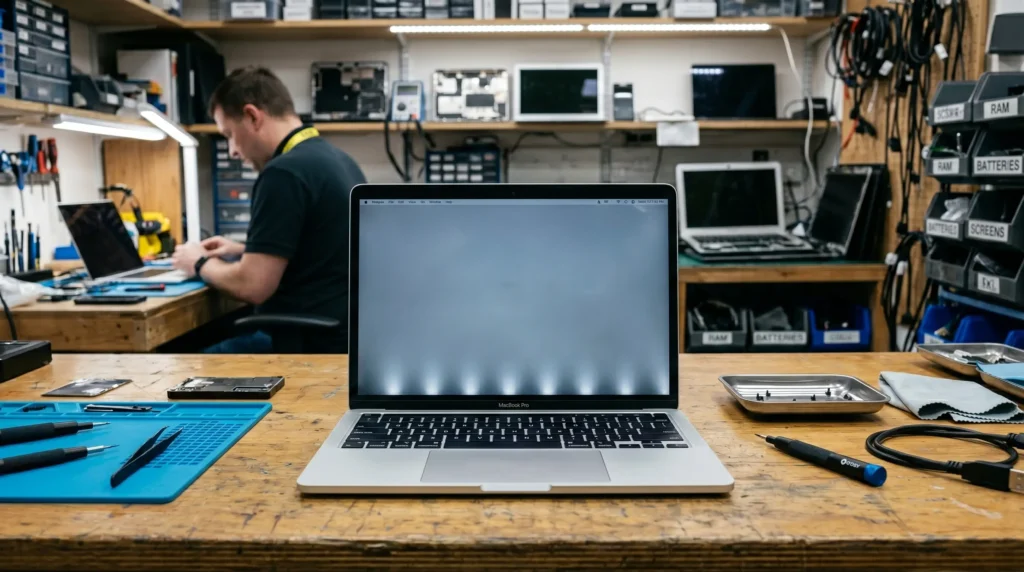
If you see bright spots or a glow at the bottom of your Macbook screen that looks like stage lights shining upward — you’ve got the stagelight effect. This is one of the most well-known Macbook display issues, primarily affecting 2016 to 2018 Macbook Pro models.
The cause? A design flaw in the backlight flex cable. Every time you open and close your Macbook lid, the cable flexes. Over time — sometimes after just a year or two of normal use — the cable wears down, and the backlight starts failing unevenly. It begins with those bright spots at the bottom and can progress to complete backlight failure.
This is directly related to what the community calls Flexgate — and it’s one of the reasons people search for a Macbook stagelight effect fix in Malaysia.
3. Flexgate — When Your Screen Goes Black at Certain Angles
Flexgate is the more advanced stage of the stagelight effect. Here’s how you can tell: your Macbook screen works perfectly when the lid is partially open, but goes completely black when you open it fully. Or vice versa.
We often fix Macbook flexgate problems at KissMyMac®. Depending on the model and how bad the damage is, we’ll let you know if a cable repair is possible or if replacing the LCD is the better long-term solution.
At KissMyMac®, we handle Macbook flexgate repair regularly. Depending on the specific model and extent of the damage, we’ll advise whether a cable repair is possible or whether LCD replacement is the more reliable long-term solution.
4. Anti-Reflective Coating Peeling (Staingate)
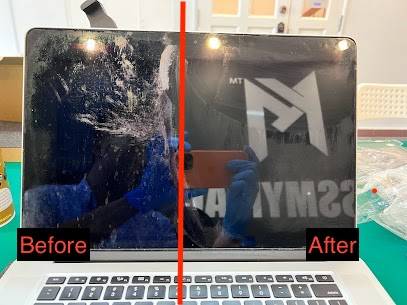
If your Macbook screen looks like it has permanent stains, smudges, or blotchy patches that won’t wipe off no matter what you use — that’s the anti-reflective coating delaminating. The community calls it “Staingate.”
This happens over time due to pressure from the keyboard and trackpad when the lid is closed, cleaning with harsh chemicals, or just general wear. Apple had a limited repair programme for this issue (within 4 years of purchase), but if your Macbook is past that window, Apple won’t cover it.
In our opinion, this is one of the most frustrating screen issues because the display underneath is usually perfectly fine — it’s just the coating that’s damaged. We can replace the LCD panel to give you a fresh, clean screen without the delamination.
Note : Here’s a Free Guide We have Developed – A FREE DIY Guide on How To Remove Staingate
5. Screen Flickering
A flickering Macbook screen can be caused by several things — loose display cable connections, GPU issues, software glitches, or a failing backlight. It might flicker constantly or intermittently, which makes it particularly annoying to diagnose without proper tools.
This is where having access to Apple System Diagnostics (ASD) through our Apple GSX system makes a real difference when performing Macbook Screen Replacement Malaysia. We don’t guess — we run Apple’s own diagnostics to pinpoint exactly whether it’s a hardware issue (display cable, LCD panel, GPU) or something that can be resolved with software. Macbook screen flickering repair cost varies significantly depending on the root cause — it could be as simple as a cable reseat or as involved as an LCD replacement.
6. Dead Pixels and Lines on Screen
Dead pixels show up as tiny black dots that never change. Stuck pixels appear as persistent colored dots. Horizontal or vertical lines across your screen typically indicate a failing LCD panel or damaged flex cable.
Based on our experience, vertical lines almost always mean the LCD panel itself has failed. Horizontal lines can sometimes be a cable issue, which is a simpler repair. Either way, these are not problems that fix themselves — they only get worse over time.
7. Display Not Turning On (But Macbook Is Running)

This is a tricky one. Your Macbook seems to be running — you can hear the startup chime or feel the fans — but the screen stays completely black. Or maybe you can faintly see your desktop if you shine a flashlight at the screen.
If you can see a faint image with a flashlight, the backlight has failed but the LCD is fine. If there’s absolutely nothing on screen, the issue could be the display, the display cable, or even the GPU on the logicboard.
This is why we always recommend proper diagnosis before jumping to conclusions. Not every “black screen” is a screen problem — sometimes it’s a logicboard issue, and replacing the screen would be a waste of money. Some other places may tell you to go straight for Macbook Screen Replacement Malaysia, but it doesn’t make sense for such situation without going thru a proper diagnosis.
LCD Replacement vs Full Display Assembly Replacement — The Difference That Saves You Money
This is the part that most people don’t know about — and it’s the reason Macbook screen replacement cost in Malaysia varies so dramatically between repair shops.
What Most Shops Do (Full Display Assembly Replacement)
When you bring a Macbook with a cracked or damaged screen to Apple or most repair shops, they replace the entire display assembly — that includes the LCD panel, the aluminium housing, the hinges, the display cables, the webcam, and the antenna cables. Everything. The whole lid.
For Apple, this is standard procedure. It’s faster for their workflow, and it guarantees everything in the display is brand new. But it also means you’re paying for a lot of parts you don’t actually need — your aluminium housing might be perfectly fine, your webcam might be working, your cables might be intact.
The result? A Macbook Screen Replacement Malaysia quote that can range from RM1,800 to RM4,000+ depending on your Macbook model.
What KissMyMac® Does (LCD-Only Replacement When Possible)
Here’s where our approach is different. If your Macbook’s aluminium display housing is not dented or deformed, we can replace just the LCD panel — the actual screen that’s cracked or damaged — while keeping everything else intact.
This is a more technically demanding repair. Separating the LCD from the housing requires precision, specialised tools, and experience. Not every shop can do it, and not every shop is willing to invest the time. However, the cost savings for the customer are significant:
| Repair Approach | Typical Cost Range | What’s Replaced |
|---|---|---|
| Full Display Assembly (Apple / most shops/KissMyMac®) | RM1,800 – RM4,000+ | Entire lid assembly — LCD, housing, cables, webcam, antenna |
| LCD-Only Replacement (KissMyMac®) | RM450 – RM2,800 | Only the LCD panel — everything else stays |
| Savings | RM500 – RM1,500+ | Depends on model |
Same visual result. Same screen quality. Significantly lower cost.
When LCD-Only Replacement Is NOT Possible For Macbook Screen Replacement Malaysia
We believe in being transparent, so here’s the honest part — LCD-only replacement doesn’t work in every situation:
- Dented aluminium display housing — If the lid is physically bent or dented from a drop or impact, we cannot mount a new LCD panel into a deformed housing. The fit needs to be precise. In this case, full display assembly replacement is the only option.
- Damaged hinges or cables — If the impact also damaged the display cables or hinge mechanism, those components need to be replaced too, which may make full assembly replacement more practical.
- Severe liquid damage to the display assembly — If liquid reached inside the display housing and damaged multiple internal components, individual replacement may not be viable.
During our FREE diagnosis, we’ll inspect your Macbook and tell you honestly whether LCD-only replacement is possible for your specific case. If it is, you save money. If it isn’t, we’ll explain why and give you the full assembly Macbook Screen Replacement Malaysia quote. No guessing, no surprises.
How Much Does Macbook Screen Replacement Cost in Malaysia?
Let’s talk numbers — because we know this is what you’re looking for.
Macbook screen replacement cost at KissMyMac® varies based on your model, the type of damage, and whether LCD-only or full assembly replacement is needed:
LCD-Only Replacement (When Housing Is Undamaged)
| Macbook Model | Estimated Cost |
|---|---|
| MacBook Air (2018 – 2020 Intel) | From RM600 |
| MacBook Air M1 / M2 / M3 | RM850 – RM1,400 |
| MacBook Pro 13″ (2016 – 2020) | RM700 – RM1,200 |
| MacBook Pro 14″ (M1 Pro / M2 Pro / M3 Pro) | RM1,200 – RM1,800 |
| MacBook Pro 16″ (M1 Pro / M2 Pro / M3 Pro) | RM1,400 – RM2,200 |
Full Display Assembly Replacement (When Housing Is Dented / Damaged)
| Macbook Model | Estimated Cost |
|---|---|
| MacBook Air (2018 – 2020 Intel) | From RM1,200 |
| MacBook Air M1 / M2 / M3 | RM1,400 – RM2,800 |
| MacBook Pro 13″ (2016 – 2020) | RM1,200 – RM1,800 |
| MacBook Pro 14″ (M1 Pro / M2 Pro / M3 Pro) | RM2,000 – RM3,800 |
| MacBook Pro 16″ (M1 Pro / M2 Pro / M3 Pro) | RM2,200 – RM4,000 |
Compare This to Apple’s Approach:
Apple Store / AASP screen replacement: RM1,800 – RM4,000+ (full display assembly only, no LCD-only option)
KissMyMac® LCD-only replacement: RM550 – RM2,300 (when possible — saves you RM500 to RM1,700+)
Same screen quality. Same visual result. Your data stays completely untouched. And remember — if we diagnose your Macbook and determine we can’t fix it, you pay nothing. That’s our No Fix, No Pay guarantee.
Why Apple Charges So Much for Screen Replacement
Here’s something worth understanding — Apple’s pricing isn’t arbitrary. It’s a consequence of their repair philosophy.
Apple doesn’t do component-level display repairs. When you bring a Macbook with a cracked screen to an Apple Store or Apple Authorised Service Provider (AASP), they replace the entire display assembly as one unit. They don’t separate the LCD from the housing. They don’t attempt to preserve undamaged components within the display.
This approach is efficient for Apple’s workflow — swap the assembly, run diagnostics, done. However, the result is that you’re paying for a complete set of parts even when only one part (the LCD panel) is actually damaged.
For a Macbook Pro 16″, this means paying RM3,600+ for a full display assembly when the actual problem might be a cracked LCD that costs significantly less to replace on its own.
This is exactly why Macbook LCD replacement as a service exists — and why shops like KissMyMac® that offer this option can save customers a substantial amount. We’re not cutting corners. We’re just not replacing parts that don’t need replacing.
Your Data Is 100% Safe During Screen Replacement
This is a concern we hear almost every day — “Will I lose my data?”
The answer is no. A Macbook screen replacement Malaysia doesn’t involve your SSD, your logicboard’s storage chips, or your operating system in any way. We’re working on the display assembly — which is physically separate from where your data lives.
Whether it’s an LCD-only replacement or a full display assembly swap, your Macbook’s storage remains completely untouched. You’ll get your Macbook back with everything exactly as you left it — your files, your apps, your settings, your desktop wallpaper. Not a single folder lost.
This is different from many Apple Store repairs, where they may require a full device wipe as part of their service process. At KissMyMac®, we don’t touch what doesn’t need to be touched.
How to Prevent Macbook Screen Damage
We’d rather you never need a screen replacement. Here are the most common causes of screen damage we see — and how to avoid them:
Don’t close the lid with objects on the keyboard. Pens, earphones, USB drives — anything sitting on the keyboard will press against the screen when you close the lid. Over time, this can crack the LCD or damage the anti-reflective coating. Based on what we encountered so far, this is one of the most common causes of screen damage that people don’t realise.
Use a proper Macbook sleeve or case. In bags, your Macbook gets squeezed between books, chargers, and other items. A good sleeve absorbs pressure and prevents direct impact on the screen.
Keep it away from pets. We’re not joking — cat bites and dog bites on Macbook screens are a real thing. We see this more often than you’d expect.
Open and close the lid gently. Especially for 2016-2018 Macbook Pro models prone to flexgate — gentle lid movements reduce wear on the backlight flex cable.
Avoid cleaning with harsh chemicals. Use only a slightly damp microfiber cloth. No Windex, no alcohol wipes, no household cleaners. These can damage the anti-reflective coating and lead to Staingate delamination.
Frequently Asked Questions (FAQ)
How much does It Cost For Macbook screen replacement Malaysia?
At KissMyMac®, Macbook screen replacement ranges from RM450 to RM4,000 depending on the model and type of replacement needed. If the aluminium display housing is undamaged, we can do LCD-only replacement — which typically costs RM450 to RM2,200, saving you RM500 to RM1,500+ compared to full display assembly replacement. Full assembly replacement (required when the housing is dented) ranges from RM1,200 to RM4,000. Compare this to Apple’s standard quote of RM1,800 to RM4,000+ for full assembly replacement only. We offer FREE diagnosis and our No Fix, No Pay guarantee means you only pay if we successfully repair your device.
What is the difference between Macbook LCD replacement and full display assembly replacement on a Macbook?
LCD replacement means replacing only the screen panel itself — the part that displays your image. The aluminium housing, webcam, antenna cables, and hinges remain in place. Full display assembly replacement means swapping out the entire lid — LCD panel, housing, cables, and all internal components as one unit. LCD-only replacement is significantly cheaper (saving RM500 to RM1,500+ depending on your model) but is only possible when the aluminium housing is not dented or deformed. At KissMyMac®, we always check whether LCD-only replacement is viable before recommending full assembly, so you get the most cost-effective repair for your situation.
Can a dented Macbook display panel be repaired?
Unfortunately, a dented aluminium display housing cannot be repaired or straightened. If the housing is physically bent or dented from a drop or impact, the only option is full display assembly replacement. This is because the LCD panel requires a precisely shaped housing to sit flush and function properly — even a small dent can cause pressure points that lead to further screen damage. At KissMyMac®, we’ll inspect the housing during our FREE diagnosis and tell you honestly whether LCD-only replacement is possible or if full assembly replacement is needed.
What is the Macbook stagelight effect and can it be fixed?
The stagelight effect is a bright, uneven glow at the bottom of the Macbook screen that resembles stage lights shining upward. It’s caused by a worn or damaged backlight flex cable — a known design flaw (called Flexgate) that primarily affects 2016 to 2018 Macbook Pro models. The cable wears down from repeated opening and closing of the lid. This can progress from the initial bright spots to complete backlight failure. At KissMyMac®, we handle Macbook stagelight effect and flexgate repairs regularly. Depending on your model and the extent of damage, we’ll advise whether a targeted cable repair or LCD replacement is the best long-term solution.
Will I lose my data during Macbook screen replacement Malaysia?
No. Screen replacement — whether LCD-only or full display assembly — does not involve your storage, logicboard, or operating system. Your SSD stays completely untouched throughout the entire process. You’ll get your Macbook back with all your files, applications, and settings exactly as they were. At KissMyMac®, we never wipe your data for a screen repair. Not a single folder lost.
How long does it take for Macbook screen replacement Malaysia?
At KissMyMac®, most screen replacements are completed within 1 to 3 working days. LCD-only replacements can sometimes be completed same-day or next-day depending on parts availability. Full display assembly replacements may take 3 to 5 working days if specific parts need to be ordered through Apple’s supply chain. We always provide an estimated timeline during the FREE diagnosis stage so you know exactly what to expect before committing.
Is it worth replacing a Macbook screen or should I buy a new Macbook?
In most cases, screen replacement is absolutely worth it. Your Macbook’s logicboard, storage, memory, and all other internals are usually perfectly fine — it’s just the screen that needs fixing. A screen repair costing RM600 to RM2,000 on a Macbook that would cost RM5,000 to RM12,000 to replace new is a straightforward financial decision. However, if your Macbook is very old (2015 or earlier), has additional problems beyond the screen, or the repair cost exceeds 50-60% of a new equivalent model, we’ll honestly recommend considering a new device instead. Our FREE diagnosis gives you the full picture before you decide.
What causes the anti-reflective coating on my Macbook screen to peel off?
This issue, known as “Staingate,” happens when the anti-reflective coating on your Macbook screen delaminates, creating permanent blotchy stains or patches. Common causes include pressure from the keyboard keys pressing against the screen when the lid is closed, cleaning with harsh chemicals (Windex, alcohol wipes, household cleaners), and general wear over time. Apple had a limited repair programme covering this within 4 years of purchase, but if your Macbook is past that window, they won’t cover it. At KissMyMac®, we can replace the LCD panel to give you a fresh screen without the delamination — the display underneath is usually perfectly fine.
Do I need to go to Apple to get my Macbook screen replaced?
No. Apple Certified Independent Repair Providers like KissMyMac® have access to the same genuine Apple parts and Apple diagnostic tools (GSX / Apple System Diagnostics) that Apple Stores use. The key difference is that we also offer LCD-only replacement — which Apple does not — saving you significant money when the housing is undamaged. We’re verified by Apple, use genuine parts, and our technicians hold Apple certifications. You can confirm our Apple IRP status at support.apple.com/repair/verify-repair-provider.
Abou the Author