

Your MacBook Battery isn’t designed to last forever. Every single charge cycle wears it down — and once it starts failing, the damage can spread fast.
A dying battery doesn’t just mean shorter battery life. It can overheat your MacBook, corrupt your files, and in worst cases, swell up and physically damage your logic board — turning a simple RM250 battery swap into a RM1,500+ repair.
The good news? If you catch the warning signs early, a professional battery replacement takes as little as 30 minutes. Knowing when to replace your Macbook battery is critical. It can cause harm and also cause benefits to your MacBook. Here are the 6 symptoms that mean it’s time.
1. Your MacBook Feels Painfully Slow — And Nothing Fixes It
You’ve tried restarting. You’ve closed all your apps. You might have even reinstalled macOS. But your MacBook still crawls.
Here’s what most people don’t realise: macOS deliberately throttles your processor when the battery can’t deliver enough power. Apple calls this “performance management” — your Mac slows itself down to prevent sudden shutdowns.
This means the sluggishness isn’t a software problem. It’s your battery silently failing behind the scenes.
The telltale sign: Your MacBook runs fine when plugged in but turns sluggish the moment you go on battery power. If this sounds familiar, your battery is the bottleneck — not your RAM, not your storage.
Don’t waste time and money on RAM upgrades or software fixes that won’t solve the real problem. Book a free battery diagnostic at KissMyMac — we’ll confirm the issue in minutes.
2. Your Battery Barely Lasts 2 Hours (When It Used To Last All Day)
Remember when your MacBook could get through a full workday on a single charge? If you’re now scrambling for a power outlet before lunch, your battery’s capacity has degraded significantly.
Here’s how it works: every MacBook battery is rated for a certain number of charge cycles — typically 1,000 cycles before it drops below 80% of its original capacity. After that, the decline accelerates fast.
What this looks like in real life:
- Your MacBook shows 100% but dies within 1-2 hours
- The battery percentage jumps erratically — 60% one minute, 25% the next
- You can’t leave your desk without a charger anymore
Many MacBook owners — especially those with machines from 2019-2022 — are hitting this wall right now. A fresh battery restores your MacBook to full-day battery life, often for a fraction of the cost of buying new.
Tired of being chained to your charger? Get your battery replaced at KissMyMac and get your freedom back — most replacements done in 30 minutes.
3. Your MacBook Overheats During Normal Tasks
If your MacBook gets uncomfortably hot just browsing the web, checking email, or watching YouTube — something is wrong.
A healthy battery generates minimal heat during normal use. But a degraded battery has to work harder to deliver the same power, creating excess heat. Combine that with macOS pushing the fans to compensate, and you’ve got a MacBook that sounds like a jet engine just to run Safari.
Why this is dangerous: Sustained overheating doesn’t just feel uncomfortable — it accelerates wear on your SSD, display, and logic board. Every day you ignore it, you’re shortening your MacBook’s overall lifespan.
On Apple Silicon MacBooks (M1, M2, M3, M4): These chips are incredibly power-efficient, so overheating during light tasks is an even stronger indicator of battery failure. If your M-series MacBook runs hot, the battery is almost certainly the culprit.
An overheating MacBook is damaging itself every time you use it. Book a diagnostic at KissMyMac before a RM550 (Price is indicative) battery issue becomes a RM1,500 logic board problem.
READ HERE : To know how long should Macbook Battery Last for your Macbook Model.
4. macOS Is Warning You — “Service Recommended” or “Replace Now”
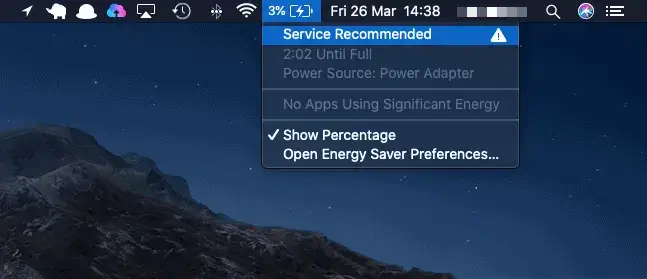
This is the one you absolutely cannot ignore.
Click the battery icon in your menu bar, or go to System Settings > Battery > Battery Health. If you see any of these messages, your battery has officially failed Apple’s own health threshold:
- “Service Recommended” — Battery health has dropped significantly
- “Replace Soon” — Battery is degraded and affecting performance
- “Replace Now” — Battery has critically low capacity
Apple doesn’t display these warnings lightly. By the time you see “Service Recommended,” your battery is already well below 80% of its original capacity.
On macOS Ventura and later, you can see your exact Maximum Capacity percentage and Cycle Count in Battery Health settings. If your maximum capacity is below 80%, replacement is overdue.
If your Mac is showing a battery warning, don’t wait. A failing battery can swell and damage internal components. Book your Macbook battery replacement at KissMyMac today — walk in, walk out in 30 minutes.
5. Your MacBook Shuts Down Without Warning — Even With Battery Left
You’re in the middle of an important email. Your battery shows 40%. Then — black screen. No warning. No “low battery” notification. Just dead.
This is one of the most dangerous symptoms of a failing battery. Random shutdowns mean your battery can no longer deliver stable power to your system. The voltage drops unexpectedly, and your MacBook has no choice but to cut power instantly.
What’s at risk:
- Unsaved work — gone in an instant
- File corruption — sudden shutdowns can corrupt your macOS system files and documents
- SSD damage — repeated forced shutdowns can degrade your storage drive over time
If your MacBook shuts down randomly — especially when it still shows battery remaining — this is not a software glitch. This is a hardware failure that gets worse, not better.
Random shutdowns put your data at risk every single time. Don’t gamble with your files — book a battery replacement at KissMyMac before you lose something important.
6. Your Battery Cycle Count Is Over 1,000
Every time you use a full charge worth of battery — whether that’s 100% in one go or 50% twice — that’s one cycle. macOS tracks this number automatically.
To check your cycle count:
Go to Apple Menu > About This Mac > System Report > Power — your current cycle count is listed there.

Here’s what the numbers mean:
| Cycle Count | Battery Status |
| Under 500 | Healthy – Performing well |
| 500 – 800 | Aging – Monitor Closely |
| 800 – 1000 | Worn – Noticeable degradation likely |
| Over 1000 | End Of Life – Replacement Recommended |
Apple rates most modern MacBook batteries for 1,000 cycles before they drop below 80% capacity. But many batteries start showing symptoms well before hitting that number — especially in tropical climates like Malaysia, where heat accelerates battery degradation.
High cycle count? Your battery is living on borrowed time. Get it replaced at KissMyMac before it starts causing bigger problems.
Why You Shouldn’t Wait to Replace a Dying MacBook Battery
You may be wondering in your head – Is Macbook Replacement Worth It?
A battery replacement is one of the most affordable MacBook repairs. But the damage a failing battery causes? That’s where it gets expensive.
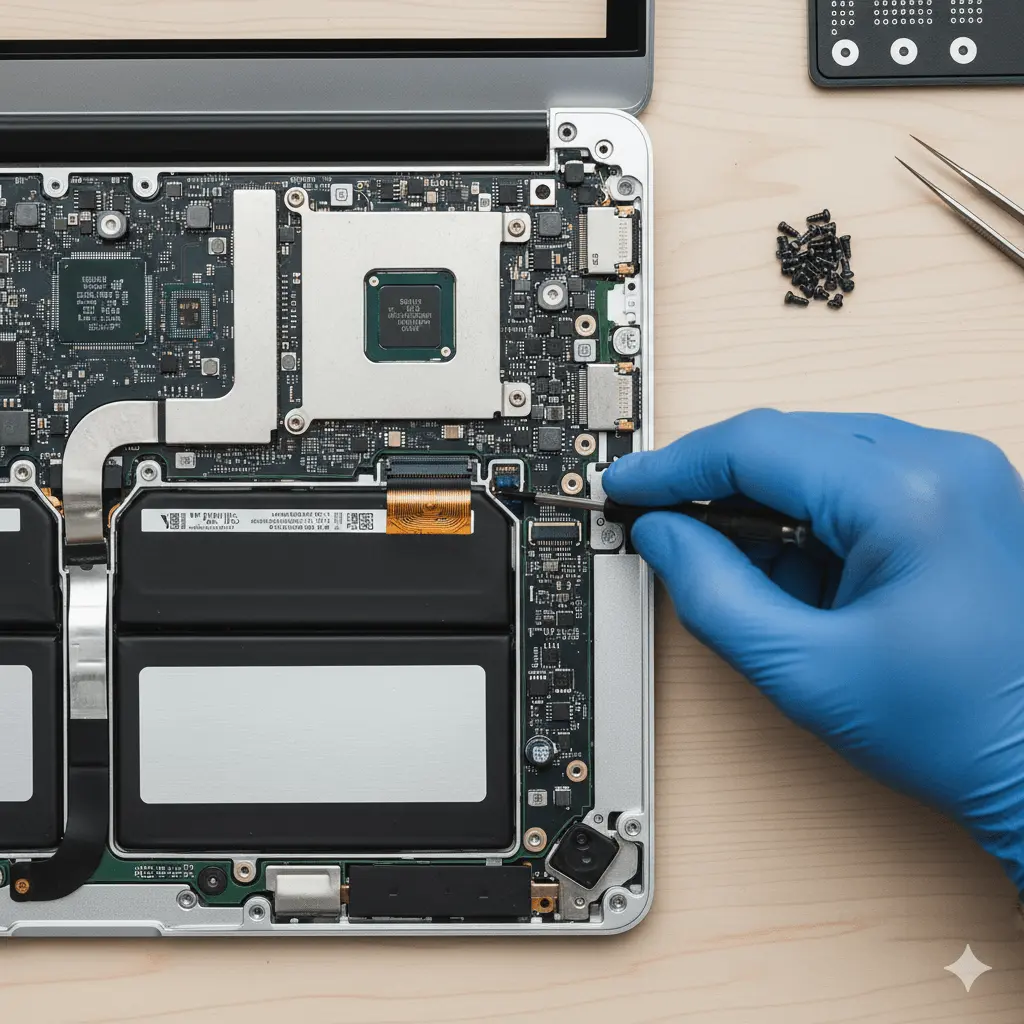
What happens when you ignore a dying battery:
- Swollen battery — pushes against the trackpad and display, warping your MacBook’s chassis
- Logic board damage — a swollen or leaking battery can short-circuit components, leading to RM1,500+ repairs
- Data loss — random shutdowns corrupt files and can make your drive unrecoverable
- Reduced resale value — a MacBook with a dead battery is worth significantly less
What happens when you replace it early:
- Full-day battery life restored
- Faster performance (no more throttling)
- Cooler, quieter operation
- Your MacBook feels like new — for a fraction of the cost
Apple Silicon Owners: Your Battery Matters Even More
If you own an M1, M2, M3, or M4 MacBook, you’ve got one of the most capable laptops ever made. But all that performance depends on a healthy battery.
Apple Silicon chips are designed to dynamically adjust power delivery. When the battery degrades, these chips can’t operate at peak efficiency — and you’ll feel the difference in everything from app launch times to export speeds.
The good news: because Apple Silicon is so efficient, a fresh battery on an M-series MacBook delivers incredible battery life — often 15-20 hours. If you’re getting less than half of that, a battery replacement brings it right back.
Frequently Asked Question
How long does a MacBook battery replacement take?
At KissMyMac, most MacBook battery replacements are completed in 30 minutes or less. Walk in during your lunch break and walk out with a MacBook that lasts all day again.
How much does it cost to replace a MacBook battery in Malaysia?
Professional MacBook battery replacement at KissMyMac starts from RM350, depending on your MacBook model. That’s a fraction of the cost of the logic board damage a failing battery can cause.
Can a bad battery damage my MacBook?
Yes — and this is why early replacement is critical. A swollen battery can warp your trackpad, crack your display from the inside, and short-circuit your logic board. What starts as a simple battery swap can turn into a RM1,500+ repair if left too long.
How do I know if my MacBook battery needs replacing?
Check System Settings > Battery > Battery Health on your Mac. If you see “Service Recommended,” if your maximum capacity is below 80%, or if your cycle count exceeds 1,000, it’s time for a professional replacement.
Does replacing the battery make my MacBook faster?
In many cases, yes. macOS throttles CPU performance when the battery can’t deliver stable power. A new battery removes this throttling, and many customers are surprised by how much snappier their MacBook feels after a replacement.
Is it worth replacing the battery on an older MacBook?
For most MacBooks from 2017 onwards, absolutely. A RM250-700 battery replacement can add 3-5 more productive years to your machine. Compare that to RM5,000+ for a new MacBook — the value is clear.
Your MacBook Deserves Better Than a Dying Battery
If you’ve recognised any of these 6 warning signs, your battery is telling you something. The longer you wait, the higher the risk of permanent damage to your MacBook — and your data.
KissMyMac specialises in fast, professional MacBook battery replacement. We use premium cells, our technicians are Apple-certified, and most Macbook Battery replacements are done while you wait, Face To Face, No data loss.
Your MacBook Deserves Better Than a Dying Battery
If you’ve recognised any of these 6 warning signs, your battery is telling you something. The longer you wait, the higher the risk of permanent damage to your MacBook — and your data.
KissMyMac specialises in fast, professional MacBook battery replacement. We use premium cells, our technicians are Apple-certified, and most replacements are done while you wait.
Book Your Battery Replacement Now →
- 30-minute turnaround
- Premium replacement batteries
- Free diagnostic included
- Warranty on all replacements
KissMyMac — Malaysia’s trusted MacBook repair specialists.
Whatsapp Us Now To Get Help For your Macbook Battery Replacement
Written By:
I am the KissMyMac® Malaysia Technician, an Apple Certified Technician at KissMyMac with More than 8 Years Of Experience In The Apple Repair Industry. We specialize in Macbook Repair & Upgrade, iMac Repair, iPhone Repair, iPad Repair in KissMyMac. We have dealt with more than 30,000+ Apple repairs throughout our years working in this industry, from a small repair shop to where we are now with 3 branches across Malaysia – KissMyMac Kuala Lumpur, KissMyMac Petaling Jaya, and KissMyMac Seremban