

TL;DR
- Don’t replace a MacBook battery on a hunch — replace it when it shows real signs of failure. Find Out What Are The Signs MacBook Battery Needs Replacing
- The 7 signs: replace/service warning, poor runtime, random shutdowns, won’t charge, swelling, health below 80%, and overheating with a high cycle count.
- Sign #4 (swelling) is a safety issue — stop using the Mac and get it checked the same day.
- Not sure? KissMyMac® (Apple Certified Independent Repair Provider, Puchong) checks your battery health free.
Tired of carrying your charger with you everywhere and looking for a power source wherever you go? Time For A Macbook Battery Replacement. Every device on the market that relies on a battery for power has such an issue that until one day, your battery doesn’t hold the charge. You may hook up your device to a power source and charge it for hours, but your battery won’t last for even half an hour. What’s happening? Most probably your MacBook Air or MacBook Pro battery is running low and you need a MacBook battery replacement.
This is just part of the signs that you need to go for a MacBook battery replacement. What are the other factors that you should take into consideration for replacing a new iPhone, iPad, Macbook Air, or Macbook Pro battery? Follow the article to learn about when you should change your Macbook, iPhone, or iPad battery.
7 Signs MacBook Battery Needs Replacing (Don’t Skip!)
1. MacBook Battery Shows “Service Recommended” or “Replace Soon” Warning
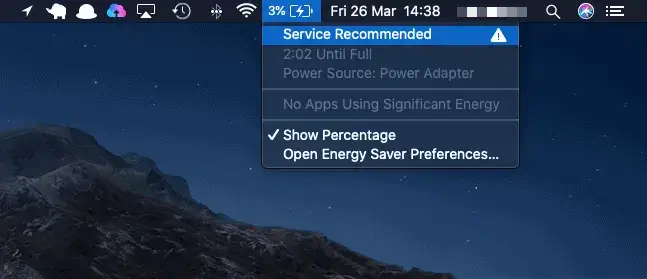
One of the easiest method to spot your battery is faulty is through the Macbook’s battery error message. If you are receiving an error message saying “Condition : Replace Soon”, “Condition : Replace Now,” or “Condition : Service Battery”, or any other related error message, consider replacing battery for your mac. Based on our experience, macbook battery faulty can cause your Macbook to overheat, sluggish performance, and some other after-effects.
Everything comes with a life, so do batteries for iPad, iPhone, Macbook Air or Macbook Pro. When the battery is charged for a certain amount of cycle, the performance of the battery starts degrading.
RELATED : How to determine your MacBook Battery Health
2. Low Battery Running-Time
This is another common symptom to replace your Macbook battery, not only Macbook, it applies to your iPhone and iPad too. As the title suggests, did you spent hours charging up your Macbook, iPhone or iPad in hope that it could last you at least half the day. Unfortunately, with the weak battery performance, it doesn’t hold long for the charge.
Your battery is draining faster than you think. After being on the phone for less than 2 hours, you need to hook your phone to the power source again. The alternative way to stay stagnant is to use a mobile power store (powerbank), but would you want to buy a few powerbanks and carrying them everywhere with you or would you want to spend a small fortune and will be able to enjoy your phone for a longer period of time with a single charge?
3. Unexpected Shutdown on your device
It is not only common for iPhone and iPad to automatically shut down out of the blues. It does happen to Macbook Air and Macbook Pro with low battery health! If your Macbook shuts down unexpectedly, be sure to plug in the power cable to it and get it charged up again. (WARNING : Remember not to always let your devices to “die” on battery as it will greatly damage battery health!). If this happens as often, then you might want to consider sending your Macbook for a diagnosis whether is it your battery is the culprit or there are some other root cause that is causing your Macbook auto shut down.
4. Unable TO Charge Macbook
Not being able to charge your Macbook Battery could also due to the Macbook battery faulty due to the battery cells are not receiving charges from the power source. You can also read our write up on how to perform a SMC Reset to reconfigure the smc chips which regulates the your power including charging the macbook battery.
Last but not least, as always, it is not difficult to replace your battery yourself. You are always welcomed to do it your own to achieve maximum satisfaction. As a Macbook Repair and Upgrade specialist, we would advise you to be extra careful when purchasing Macbook, iPhone or iPad batteries, to not purchase any after market batteries because of the highly affordable price, it might explode when it gets overheated and it will only cause you more harm than good.
At KissMyMac, we offer MacBook battery replacement services for all Macbooks, including Macbook Air, and Macbook pro with high quality certified parts. You don’t have to wait for a few days to replace a brand new battery for your MacBook Air or MacBook Pro. The Macbook battery replacement service takes within an hour and you can continue rocking with your device. You will be guaranteed up to a 12-month warranty period, calculated on the date of your purchase.
For further information regarding macbook battery replacement service or any kind of repair and Upgrade Services for iPhone, iPad, Macbook, Macbook Air and Macbook Pro, you are always welcomed to contact us at +6014-397 6587 or contact us via our contact Page.
5. Your MacBook Battery Is Swelling (Trackpad Won’t Click)
A swollen battery is the one sign you should never wait on. As lithium-ion cells age or fail, they can puff up and physically push against the trackpad and bottom case. The tell-tale signs: a trackpad that feels stiff or won’t click properly, a case that no longer sits flat on your desk, or a visible bulge along the bottom.
A swelling battery is a genuine safety risk — stop using the MacBook on your lap and avoid charging it. This isn’t a “monitor and see” situation; it’s a same-day job. Bring it in for a free, no-obligation safety check at KissMyMac and we’ll confirm on the spot whether the battery needs replacing.
6. Battery Health Has Dropped Below 80% (or Shows “Service Battery”)
Open the Apple menu → System Settings → Battery → Battery Health. If macOS reports “Service Recommended”, “Service Battery”, or a Maximum Capacity below 80%, Apple itself considers the battery consumed. Below that threshold you’ll notice the charge vanishing faster, the MacBook throttling its own performance to protect the cell, and the percentage jumping around unpredictably.
Health below 80% is the clearest, most objective sign your MacBook battery needs replacing — there’s no setting or software fix for a chemically worn cell. Not sure how to read your numbers? Send us a screenshot or pop in, and we’ll check your battery health free and tell you honestly whether it’s time.
7. It Runs Hot With a High Charge-Cycle Count
Every MacBook battery is rated for a set number of charge cycles — most modern models around 1,000. Once you’re past that count, capacity falls off quickly. Pair a high cycle count with a MacBook that runs hot during light tasks, has fans spinning constantly, or feels warm even when idle, and the battery is very likely on its way out — heat both signals the decline and speeds it up.
You can check your cycle count under System Information → Power. If it’s near or past the limit and the machine runs hot, don’t wait for a sudden shutdown to make the decision for you — book a replacement and get back to a Mac that lasts a full day.
Ready to replace? Book your MacBook battery replacement at KissMyMac → MacBook Battery Replacement Service at KissMyMac — Apple Certified Independent Repair Provider in Kuala Lumpur, Petaling Jaya and Seremban. Free battery health check, honest advice, no pressure.