
How to Choose a MacBook Repair Shop in Kuala Lumpur
9 red flags to help you choose a MacBook repair shop in Kuala Lumpur — from an Apple Certified IRP that's handled 30,000+ repairs.
- →The 1 question that filters 80% of bad KL Mac shops: Guide on how to choose a MacBook repair shop in Kuala Lumpur - ask for their Apple Certified Independent Repair Provider verification — a real shop hands over the link in seconds.
- →Most KL MacBook horror stories don't come from bad luck. They come from 9 specific red flags people only spotted after paying.
- →This page is the shop-vetting checklist. If you want the broader pre-repair primer first, see Important Things to Know About MacBook Repair in Malaysia.
- →Already booked an opinion? Compare with how KissMyMac handles each of these checks.
Why Googling 'best MacBook repair in KL' won't help you choose the right shop
When you need to choose a MacBook repair shop in Kuala Lumpur, the top Google result rarely tells you what matters — what’s wrong with your machine, what model year it is, and what you actually care about: data preservation, cost, turnaround, or warranty. Most shops skip that part and just say ‘pick us.’ That’s not helpful at 6:47 PM on a Friday when your MacBook Pro won’t power on.
So we built this differently. Instead of telling you we’re the best, here’s a complete framework for how to choose a MacBook repair shop in Kuala Lumpur — vetting any shop on your shortlist, from Lowyat to SS2 to Taman Desa, and yes, us. For the Malaysia-wide opinion on this, see The Brutal Truth Behind Mac Repair in Malaysia →
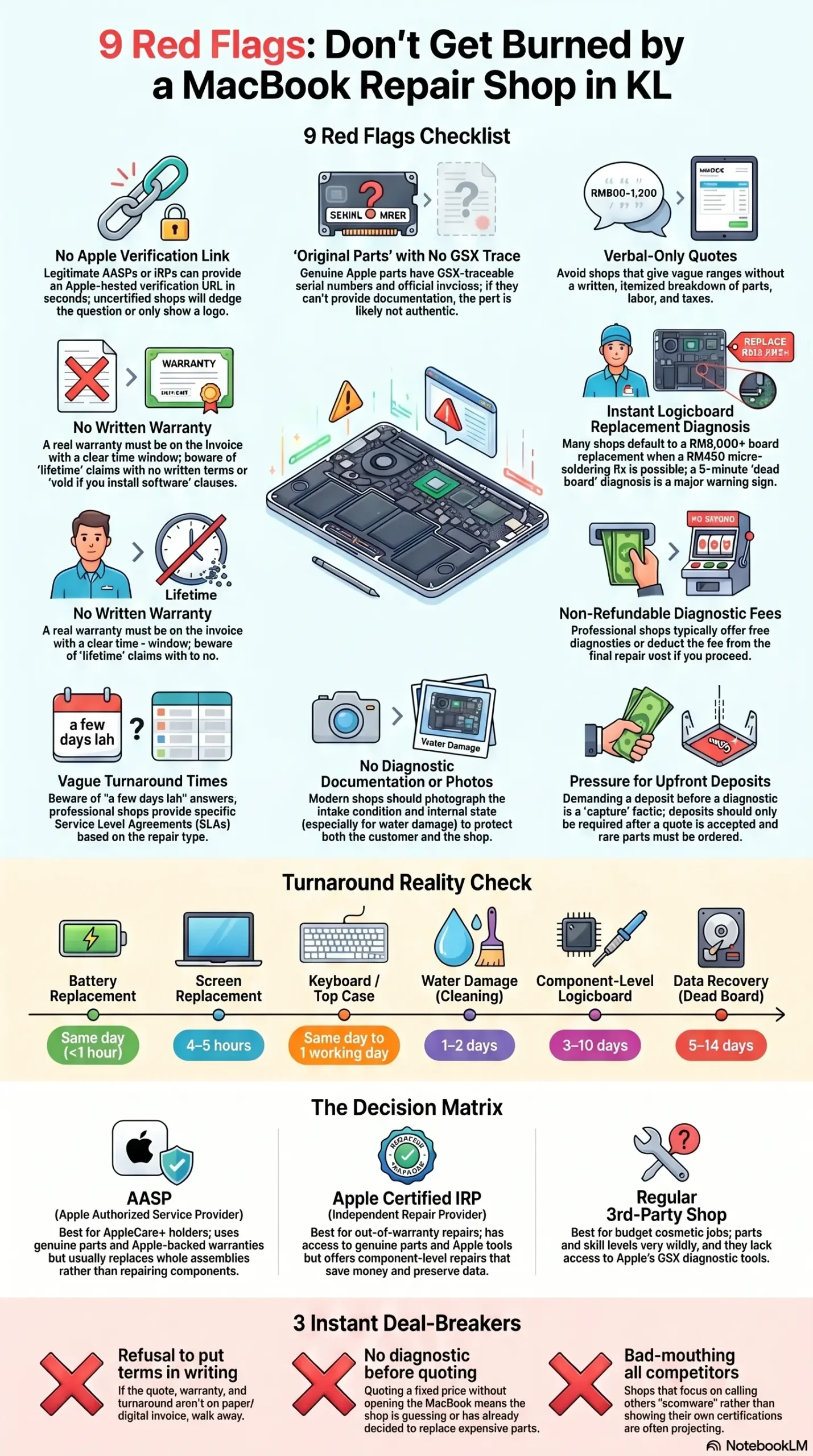
9 red flags checklist: How To Choose A MacBook repair shop in Kuala Lumpur
Most customers who came to us Googled How to choose a MacBook repair shop in Kuala Lumpur had already been to a different shop first. These are the red flags they only spotted after paying. See the issue-level companion guide →
🚩 1. No Apple Authorised or Independent Repair Provider verification
There are two legitimate Apple repair credentials in Malaysia: Apple Authorised Service Provider (AASP) and Apple Certified Independent Repair Provider (IRP). Anything outside those two tiers is a regular third-party shop.
The 30-second test: ask the shop ‘Can you send me your Apple IRP verification link or AASP listing?’ A legit IRP pastes an Apple-hosted URL within seconds. A non-certified shop dodges the question, says ‘we use Apple parts’ (a different claim entirely), or sends you a logo image instead of a verifiable link.
🚩 2. 'Original Apple parts' claim with no GSX trace
‘We use original Apple parts’ is the most abused phrase in the KL Mac repair market. A real Apple-issued part comes with a GSX-traceable serial number (Apple’s Global Service Exchange system), an invoice tying the part to a specific repair job.
What to ask: ‘After the repair, can you give me the part’s GSX trace?’ A serious shop says yes.
🚩 3. Verbal-only quotes and no itemised invoice
If the quote comes as ‘around RM800 to RM1,200, depends what we find inside’ with nothing in writing — pause. A trustworthy KL Mac shop gives you a written quote after the diagnostic, an itemised breakdown (part cost, labour, taxes), and a clear note on what happens if mid-repair surprises appear.
We’ve seen customers walk in for a battery quoted ‘around RM400’ and walk out with a RM1,500 bill because nothing was in writing.
🚩 4. No written warranty period (or warranty that vanishes if you 'do anything')
A real warranty is in writing, has a clear time window (we offer 6 months on most repairs), and survives normal use.
Watch out for: ‘lifetime warranty’ with no terms (marketing speak), ‘warranty void if you install any software’ (escape hatch on a hardware repair), or no warranty at all on open-and-clean repairs.
When you need to know how to choose a MacBook repair shop in Kuala Lumpur, warranty terms in writing is non-negotiable
Ask: ‘What’s the warranty period, and can you write that on the invoice?’ Bonus: ask about No Fix, No Pay — if the shop can’t fix the issue, you owe nothing. Read why it matters →
🚩 5. Quick 'logicboard not repairable, must replace' diagnosis
This is the most expensive misdiagnosis in the KL Mac repair scene. Most KL shops default to ‘replace the whole board’ — RM5,000–RM10,000 on a 2020+ MacBook Pro. But many logicboard failures (burnt capacitors, blown power IC, charging chip damage, water-corroded traces) are fixable at the component level for RM450–RM1,500 if the shop has a micro-soldering technician.
If the diagnosis is ‘logicboard cannot repair’ within 5 minutes — that’s a tell. Real diagnostics take time, schematics, and a multimeter.
A close cousin: shops that declare a MacBook ‘dead’ without proper diagnostic. Many ‘won’t turn on’ MacBooks are fixable for under RM800 →
🚩 6. Non-refundable diagnostic fee, even if you proceed
A diagnostic fee on its own isn’t a red flag. What we watch for is when it’s non-refundable even if you go ahead with the repair — meaning you’re paying RM150–RM300 just for someone to look at it, on top of the repair cost.
Honest practice: free diagnostic (what we do), or diagnostic fee deducted from the repair price if you proceed, or refunded if not.
🚩 7. Vague turnaround time with no SLA
‘A few days lah’ is not an answer. Realistic KL Mac repair timelines:
| Repair | Realistic turnaround |
|---|---|
| Battery replacement | Same day (often <1 hour) |
| Screen replacement | 4–5 hours |
| Keyboard / top case | Same day to 1 working day |
| Water damage (clean only) | 1–2 days |
| Water damage + corrosion | 3–7 days |
| Component-level logicboard | 3–10 days |
| Data recovery (dead board) | 5–14 days |
Quote ‘1 week’ for a battery? Skill gap. Quote ‘same day’ for a complex logicboard? Bluffing. Ask for the specific number of working days.
🚩 8. No before/after photos and no diagnostic documentation
Modern professional shops in 2026 should be photographing the intake condition, the internal state once opened (especially for water damage — matters for insurance claims), and the repaired component after the fix.
This protects both of you. If a shop refuses to send a photo of the inside of your MacBook after opening it, ask yourself why.
🚩 9. Pressure to pay upfront before any diagnostic
The single biggest scam pattern: a deposit demanded before any diagnostic, on the basis that ‘we need to order the part first.’ For 95% of repairs, the shop should: do a free or refundable diagnostic → confirm what’s wrong → quote a fixed price → then take a deposit only if a rare part needs ordering.
If the conversation starts ‘RM500 deposit first, then we’ll check it’ — walk away. That deposit is usually how they capture you even after you discover the repair isn’t worth it.
The 6 Questions to Ask Any KL Mac Repair Shop
Send these as a WhatsApp message before you walk in. The replies will tell you more than any Instagram page.
- For my [model + symptom], what's your standard diagnostic process and is the diagnostic fee refundable if I don't proceed?
- If parts are needed, are they Apple Genuine with GSX trace, or sourced grade-A?
- What's your written warranty period for this type of repair?
- Do you do component-level logicboard repair in-house, or do you only offer full board replacement?
- What's the realistic turnaround in working days, and what happens if it goes longer?
- Do you keep my data intact during the repair, or do I need to back up first? Will anyone access my login?
AASP vs Apple Certified IRP vs Backlane Shop
Decision matrix
| AASP Apple Authorised Service Provider | Apple Certified IRP Independent Repair Provider (what we are) | Regular 3rd-Party Shop | |
|---|---|---|---|
| Apple parts access | ✅ Yes (Genuine) | ✅ Yes (Genuine via Apple) | ⚠️ Claims vary — verify |
| GSX diagnostic tools | ✅ Yes | ✅ Yes | ❌ No |
| Apple-certified technicians | ✅ Required | ✅ Required | ❌ Not required |
| Component-level logicboard repair | ❌ Usually replaces whole board | ✅ Often available | ⚠️ Skill-dependent |
| Typical pricing | RM RM RM | RM RM | RM |
| Data preservation | ⚠️ Often wiped on board swap | ✅ Usually preserved | ⚠️ Depends |
| Warranty | ✅ Apple-backed | ✅ Shop-backed, written | ⚠️ Verbal or none |
| Best for | AppleCare+ holders, in-warranty, simple swaps | Out-of-warranty, complex faults, data-sensitive, quality-conscious | Cosmetic-only / budget jobs where data doesn\'t matter |
3 Deal-Breakers — If Any Happen, Walk Away
Three signs you’ve already answered how to choose a MacBook repair shop in Kuala Lumpur — incorrectly.
A handshake repair in 2026 is a recipe for 'but you said RM400' arguments.
If they're quoting a fixed price before opening your MacBook, they've either already decided to replace something — or they're guessing.
Strong shops let their work speak. Shops that spend 5 minutes telling you why 'the other guys are scammers' are usually projecting.
What a Trustworthy KL Mac Repair Engagement Looks Like
Once you know how to choose a MacBook repair shop in Kuala Lumpur, a trustworthy engagement follows a clear sequence.
- 1You WhatsApp the symptom (e.g., 'MacBook Pro 2021 won't charge, M1 Pro 14-inch'). You get a reply within working hours acknowledging and asking 2–3 diagnostic questions.
- 2Free diagnostic confirmed. They give you a slot, you walk in or courier in.
- 3Same-day diagnostic results for most issues. Written quote with parts, labour, turnaround, and warranty.
- 4You approve the quote in writing. Work begins.
- 5Updates at key milestones — opened, fault confirmed, part installed, testing, ready for pickup.
- 6Pickup with a working invoice showing parts, warranty period, and what was done.
- 7Warranty card or warranty terms in writing, plus contact for follow-up issues.
Two real engagements from our bench
A KL business owner walked in with a 2019 MacBook Pro 16-inch that another shop had quoted RM6,000 to repair ('logicboard must replace'). Our diagnostic took about 90 minutes — a single failed power management IC. Component-level repair, RM550, 4 working days. He kept all his data. Two years later, his entire team's Macs come to us.
A freelance designer in Bangsar spilled half a cup of kopi peng on her MacBook Air at 8 AM, brought it to us by 10 AM. The honest answer was: come in fast, don't try to turn it on, accept that water damage takes 3–7 days because corrosion has to be cleaned properly. Final bill: RM850. No data loss. The lesson — speed of response matters more than speed of repair.
Our Happy Customers
Frequently Asked Questions
The questions below come up every time someone is deciding how to choose a MacBook repair shop in Kuala Lumpur
How do I verify if a KL MacBook repair shop is really Apple Certified?
Ask the shop directly for their Apple Authorised Service Provider listing or Apple Certified Independent Repair Provider verification link. A legitimate shop can produce an Apple-hosted URL on request. If they only show you logos or ‘we are authorised’ wording without a verifiable link, treat that as unverified until proven otherwise.
Is the cheapest KL MacBook repair always the worst?
Not always — for cosmetic-only or non-data-critical jobs, a cheaper shop can be fine. But for anything involving the logicboard, water damage, screen replacement on a 2018+ MacBook Pro, or any repair where data matters, ‘cheap’ usually means non-genuine parts, no warranty, or a junior technician learning on your machine. The total cost over 12 months is often higher.
AASP vs Apple Certified IRP — what's the difference in Malaysia?
Apple Authorised Service Providers (AASPs) operate as part of Apple’s own service network and follow Apple’s standard repair playbook, which usually means replacing whole assemblies. Apple Certified Independent Repair Providers (IRPs) are independent shops who passed Apple’s certification, source Genuine Apple Parts via Apple’s program, and use Apple’s diagnostic tools — but they also typically perform component-level repairs that AASPs don’t. KissMyMac® is an Apple Certified Independent Repair Provider, not an AASP.
Should I worry about my data when sending my MacBook for repair in KL?
Yes — and the right shop has a clear answer. Ask whether your data stays on the device during the repair (it should, for most non-board-swap repairs), whether anyone accesses your login (they shouldn’t need to for hardware work), and what happens if the logicboard is replaced (in an AASP flow it’s often wiped; in a component-level IRP flow it’s usually preserved). Get the answer in writing before you hand over the device.
How long does a proper MacBook diagnostic take in KL?
A surface-level diagnostic (battery cycle check, etc.) takes 5–10 minutes. A real fault diagnostic for ‘won’t turn on,’ ‘no charging,’ or ‘water damage’ should take 30 minutes to a few hours — the technician has to test each suspect circuit. Anyone diagnosing a logicboard fault in under 5 minutes hasn’t actually diagnosed it.
Can a KL Mac repair shop access my photos and passwords?
For most hardware-only repairs (battery, screen, keyboard, trackpad, charging port), the shop does not need your login at all and shouldn’t ask. They only need access to verify the machine boots and the repair worked, which they can do through pre-arranged guest accounts or by asking you to log in at pickup. If a shop demands your Apple ID password upfront, that’s a hard red flag.
Is it worth repairing an older MacBook in KL or should I just buy a new one?
Short answer: under 30% of new-equivalent cost it’s almost always worth repairing; above 50% it gets harder and you should get a second opinion. We’ve written the full decision framework — model age, recurring-fault check, residual value — in Is It Worth To Repair Your Mac? →
Ready to put a KL shop through these checks?
Bring your MacBook to KissMyMac® Taman Desa — we’ll do the diagnostic for free and quote everything in writing. Ask us all 7 questions before you decide.
Payment Methods
We Accept All Payment Methods including Installment Plans. Repair Now and Pay Later


