Comprehensive Macbook Logicboard Repair Service In Malaysia
Are you facing issues with your MacBook Air Or Macbook Pro and in need of a Macbook logicboard repair in Malaysia? Your Macbook Cant On/ Macbook Cant Turn On? Spilled Liquid on your Macbook? Macbook Auto Restarting? Smell Burn Smell from Your Macbook? Look no further! Our KissMyMac team of experts has put together a comprehensive guide to help you get your device back to working order.
Our Expert Macbook Air Logicboard repair/Macbook Pro Logicboard Repair is backed by Certified Trained Expert with more than 10 years of experience, designed to help you repair your Macbook without losing any data!
Why Choose Us?
KissMyMac™ is Certified Apple Independent Repair Provider (IRP) in Malaysia Nationwide. We have access to Apple Genuine Parts to perform Genuine Macbook Repair by using Apple Tools and Systems to conduct the repair, ensuring your Macbook Maintain At Its Top Performing Condition!

Common Macbook Logicboard Problems
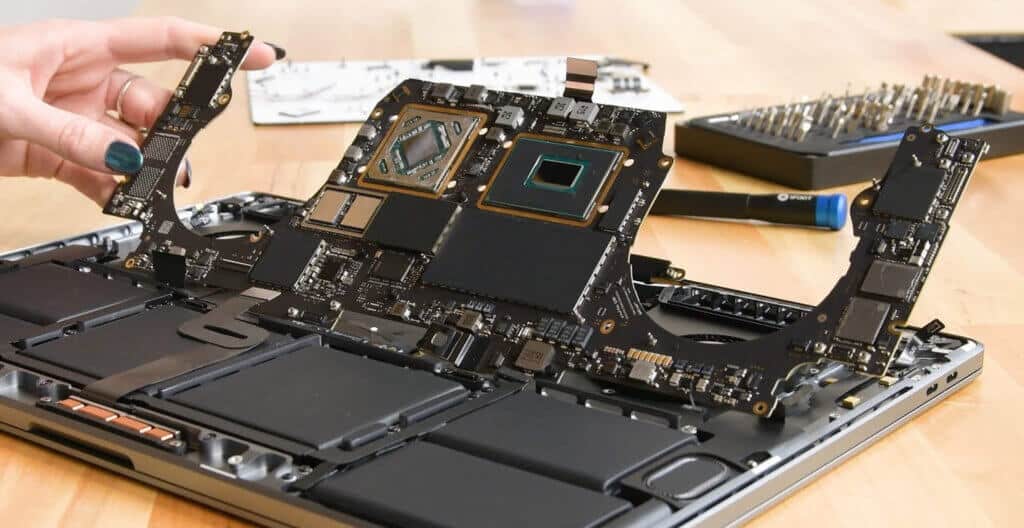
This service is to repair the Macbook logicboard (a.k.a motherboard) for all Macbooks, Macbook Air, Macbook Pro, and iMac by using micro-soldering technique to perform analysis to diagnose and replace/recover the damaged circuits and electronic components on the logicboard.
Here are some of the most common symptoms/causes that we found based on research and experience that requires Logicboard Repair:-
- Unable to Turn ON/NO Power
- No backlight
- Macbook Auto-Restarts
- Water Damage
- Unable To Charge (After Testing With A Working Charger and Battery)
- USB Not working/Not Detected
- Auto-restart
- Short circuit
- CPU Damage
- No Audio Detected
- No Display Detected
- Wifi Not Working (For Macbooks That Have Onboard Wifi Chips)
- No Display Backlight
- No Battery Detected
Above are some of the most common possibilities for Macbook Logicboard Problems. There are more possibilities of a Macbook Logicboard Damage, but that will require further diagnosis by our technician.
Frequently Asked Questions (FAQ)
To determine if the logic board is indeed the root cause of the problem, you can run a diagnostic test on your MacBook Air. Here’s how:
- Disconnect any external devices connected to your MacBook Air.
- Turn off your MacBook Air.
- Hold down the D key and press the power button to turn on your MacBook Air.
- Release the D key when you see the Apple logo.
- Wait for the diagnostic test to complete.
If the diagnostic test identifies a problem with the logic board, it’s time to get it repaired.
Generally, Macbook Logicboard Issue is rather Straightforward and easy to identify.
If you notice below symptoms, usually these are problem related to Macbook Logicboard:-
1. Unable to power on
2. Liquid Damage to Your Macbook
3. Smell burnt smell from your Macbook
4. Unable to charge (sometimes can be related to battery or charging port, sometimes logicboard)
5. Unable to turn on due to usage of non original Apple Charger
6. House/Office Just Experience a Power Trip
Macbook Logicboard Repair Involves micro-soldering techniques to diagnose faulty electronic chips on the logicboard and replacement of damaged electric components and recovering of electric circuits that is preventing the Macbook from performing its suppose work.
At KissMyMac, We offer component level logicboard repair for the Macbook, Macbook Pro, and Macbook Air. We can even repair liquid damaged boards! All repair works are done in-house by our skilled technicians to ensure quality and consistency of our work.
The repair process for a logic board is a complex and delicate task that should only be performed by a professional. Here are a few reasons why:
- A professional has the necessary tools and equipment to diagnose and repair the issue.
- An expert has the knowledge and experience to handle the delicate components of the logic board.
- A professional repair service will also have access to the required spare parts.
In Malaysia, there are several reputable repair services that offer logic board repair services for MacBook Air devices. It’s important to choose a service that has a good track record, positive reviews, and qualified technicians.
Yes they are 9 out of 10 Logicboards are repairable unless the Macbook Logicboards are severely damaged.
At KissMyMac, we run on a No Fix, No Fee Basis. If we can’t fix your Macbook’s Logicboard, we will not charge you upon collection of the Macbook’s Corpse.
All Macbook’s Logicboard fixed by us comes with a 90 days warranty.
If problem still persist, we will refund you the money paid.
At KissMyMac, Macbook Logicboard Repair usually needs between 3 days to 2 weeks (depending on the severity of the damage).
The reason why we introduced Macbook Logicboard Repair service is that we believe every Macbooks deserves a second life.
Repairing Macbook’s Logicboard is much cost effective than replacing macbook’s logicboard unless not repairable.
At KissMyMac, Macbook Logicboard Repair typically takes 3 days to 14 days to restore the Macbook. Depending on the level of complexity of the repair, for serious damage like water damage, we may require more time to perform logicboard repair as the liquid has contaminated many parts of the logicboard which our technician is required to perform detailed diagnosis and repair under microscope.
Macbook Logicboard Repair Cost Varies From RM450 to RM1500 depending on complexity/severity of the logicboard repair required.
If your Macbook is water damaged, then it may incur more cost as more parts are being damaged. If your Macbook is damaged due to burn/short circuited components, the repair cost may be lower.
Rest assured, the logicboard damaged Macbook will be assessed by our KissMyMac professionals with a quote provided. We will get your consent before conducting repair.
Macbook Repair Cost Varies. The repair cost is divided into 3 different types of repairs. Namely, Level 1 Repair, Level 2 Repair and Level 3 Repair.
Level 1 Repair : Involves MacOS Reconfiguration, System Settings Reconfiguration, etc.
Level 2 Repair : Involves Minor Part Replacement such as Macbook Battery replacement, macbook keyboard replacement, macbook trackpad replacement, etc.
Level 3 Repair : Involves Micro soldering. Normally this involves Macbook Logicboard Repair, water Damage repair, etc.
Process Flow For Macbook Logicboard Repair
To determine if the logic board is indeed the root cause of the problem, you can run a diagnostic test on your MacBook. Here’s how:
- Disconnect any external devices connected to your MacBook.
- Turn off your MacBook.
- Hold down the D key and press the power button to turn on your MacBook.
- Release the D key when you see the Apple logo.
- Wait for the diagnostic test to complete.
If the diagnostic test identifies a problem with the logic board, it’s time to get it repaired.
Note : You may skip the above steps if your macbook is completely not responding. You can bring to any KissMyMac for a free diagnosis.
The repair process for a logic board is a complex and delicate task that should only be performed by a professional. Here are a few reasons why:
- A professional has the necessary tools and equipment to diagnose and repair the issue.
- An expert has the knowledge and experience to handle the delicate components of the logic board.
- A professional repair service will also have access to the required spare parts.
In Malaysia, there are several reputable repair services that offer logic board repair services for MacBook devices. It’s important to choose a service that has a good track record, positive reviews, and qualified technicians.
Based on More than 10+ Years of Industry Experience at KissMyMac and attending Apple training, below are some tips on “How to Prevent Your Macbook Logicboard From Failing Again”
- Always use Apple Original Charger. Do not use After Market Charger as the power block does not have a fuse which protects the macbook from any power surge.
- Use a Certified Surge Protector Extension Cord. Surge Protector Extension can help prevent power surge in the event of any thunderstorm or accident. This can help block any excessive power surge from damaging your macbook.
- Always Use Suitable Power Adaptor. For example, your Macbook Pro requires 60W power adaptor but you are using a 35W power adaptor, which causes under power and this can cause short circuit to your Macbook.
- Keep Your Macbook Away from Any Magnets. Magnet emit magnetic field that can have negative reaction with the components on the logicboard of a Macbook.
- Keep Your Water Bottle or Any Liquid Away. Always make sure that your water bottle or cup is away from your Macbook. In any event of accidental spill, this can be detrimental for your Macbook.
7 Common Reported Issues About Macbook Logicboard Repair
Our Happy Happy Happy Macbook Logicboard Repair Customers
Book Appointment For Macbook Logicboard Repair
It is as easy as clicking the button below to book an appointment
Payment Methods
We Accept All Payment Methods including Installment Plans. Repair Now and Pay Later