

Key Points
- MacBook display problems fall into 8 visual symptoms — each points to a different probable cause (LCD panel, display cable, GPU, or backlight circuit).
- Most screen line and ghosting cases are LCD-only problems. No need to replace the full display assembly. Saves you RM500–RM1,500.
- A completely black screen is NOT necessarily a dead logicboard. Most of the cases we see have a much simpler cause.
- Get a free diagnostic before anyone quotes you a screen repair. A quote without physically inspecting the machine is just a guess.
You opened your MacBook this morning and something was wrong. Maybe a thin vertical line cutting through your wallpaper. Maybe the screen is completely black but you can still hear the startup chime. Maybe colours are ghosting, flickering, or smearing as you scroll.
Whatever you are seeing — you are in the right place. This guide covers all MacBook models — Air, Pro, 13-inch, 14-inch, 16-inch, Intel and Apple Silicon — and every kind of display symptom. If you own a Mac and the screen is misbehaving, this is written for you.
In this article, we are going to walk you through 8 display symptoms we see every week at KissMyMac® for Macbook Screen Lines Repair Malaysia. For each one, we will tell you what is probably causing it, what the repair path looks like, and whether it is even worth fixing. We have been opening and repairing MacBook displays for over 10 years. Honestly, by the time a customer describes their symptom over WhatsApp, we already have two or three suspects in mind.
Want a free first opinion? WhatsApp KissMyMac® a photo of your screen and we will send you an honest assessment — before you even step out of the house.
In This Guide
- Symptom 1 — Vaertical Lines
- Symptom 2 — Horizontal Lines
- Symptom 3 — Coloured Bands or Tint
- Symptom 4 — Ghosting or Smearing
- Symptom 5 — Black Screen with Backlight On
- Symptom 6 — Completely Black Screen
- Symptom 7 — Flickering or Strobing
- Symptom 8 — Burn-In or Image Retention
- Software or Hardware? Checklist
- Repair or Replace?
- Repair Costs in Malaysia
- Why KissMyMac®?
- FAQ
The 8 MacBook Display Symptoms — What They Actually Mean
Based on what we have encountered so far, these are the 8 patterns that walk through our doors every single week. Some look dramatic but are actually quick fixes. Some look minor but are early signs of something bigger. We will be straight with you about which is which.
Symptom 1 — Vertical Lines Across the Screen

One or more sharp lines running top to bottom. They can be white, black, pink, or a specific colour — sometimes a single hairline, sometimes a thick band, sometimes a cluster that appeared overnight.
Probable cause: LCD panel failure — specifically the column driver circuitry along the top edge of the panel. Based on what we encounter, roughly 70% of vertical line cases are the LCD panel itself. The other 30% are a partially unseated display data cable (the ribbon cable connecting the panel to the logicboard). Either way, this is a display-side problem. Your logicboard and GPU are almost certainly fine.
Repair path at KissMyMac®: Free diagnostic to confirm panel vs cable. If it is the panel —the only way for Macbook Screen Lines Repair is LCD-only replacement, keeping your existing housing, hinges, webcam, and antenna. Genuine Apple panel through our IRP supply chain.
Note: Do not let anyone quote you a full display assembly replacement for vertical lines unless your housing is physically dented or bent. LCD-only is almost always viable, and it saves you RM500–RM1,500 vs a full assembly. Visit our Macbook Screen Replacement Page for more about Macbook LCD Replacement for Macbook Screen Lines Repair.
Symptom 2 — Horizontal Lines Across the Display

MacBook Screen Horizontal Lines running left to right — usually thicker and more disruptive than vertical ones. They may flicker, shift position, or change depending on how far you open the lid.
Probable cause: Row driver failure on the LCD panel itself, or a damaged display data cable (the LVDS/eDP ribbon). On 2018–2020 MacBook Pro models especially, hinge wear gradually pinches this cable — we see this a lot on machines that have been opened and closed thousands of times in office or cafe environments.
Before you come in, try this: Plug your MacBook into an external monitor via USB-C or HDMI. If the external is clean — no lines, no artifacts — your logicboard and GPU are completely healthy. The fault is purely on the display side. If the external also shows problems, scroll down to Symptom 7.
Repair path at KissMyMac®: External clean = LCD or cable replacement. External also broken = GPU or logicboard component repair. Free diagnostic confirms which. Visit our Macbook Screen Replacement Page for more about Macbook LCD Replacement for Macbook Screen Lines Repair.
Symptom 3 — Coloured Bands or Tint Across the Screen

Pink, green, magenta, or yellow bands. Sometimes a single colour wash over one half of the display. Sometimes diagonal stripes that shift when you tilt the lid.
Probable cause: Almost always the display cable connector. Either the cable is not seating cleanly, the connector on the logicboard side has a bent or oxidised pin, or the cable has worn through at a flex point. If your symptom changes when you adjust the lid angle — that is a very strong signal. The cable is flexing and losing contact.
In our experience, this symptom gets misdiagnosed a lot. Customers come in after a nearby shop told them they need a new screen. Most of the time, we solve it with connector cleaning or a cable replacement — not a full panel. Much smaller job, much lower cost.
Repair path at KissMyMac®: Component-level connector inspection and cleaning, cable replacement if needed. If the GPU turns out to be at fault — component-level logicboard repair. Free diagnostic first, always.
Symptom 4 — Ghosting, Smearing, or Image Trails
Text leaves a faint trail when you scroll. Your cursor casts a shadow. Close a window and its outline lingers for a second before fading.
Probable cause: LCD panel response degradation — usually age-related, sometimes accelerated by the MacBook running hot over a long period. If your machine has been warm for months (loud fans, hot base), that speeds up panel ageing. On rare occasions it is GPU-related, but in our experience that is more the exception than the rule.
We usually see ghosting on MacBook Pros that are 5–7 years old and have been running hard. The panel is simply tired.
Repair path at KissMyMac®: Free diagnostic. Most ghosting cases end in LCD replacement. If we suspect a thermal root cause — we will recommend a logicboard thermal repaste (replacing the dried thermal compound on the CPU and GPU) and fan service first, let it run cooler for a few weeks, then reassess.
Note: A thermal repaste at KissMyMac® is RM150–RM250. Sometimes that is the right first step before committing to a panel replacement. We will tell you honestly if that is the case. Visit our Macbook Screen Replacement Page for more about Macbook LCD Replacement for Macbook Screen Lines Repair.
Symptom 5 — Black Screen but Backlight Is On

You can see the screen is glowing — there is light behind the glass — but no image. Sometimes at a very steep angle, a faint shadow of your desktop appears.
Probable cause: Display data cable failure (the image signal is not reaching the panel), or a dead LCD panel with a still-working backlight circuit. On 2016–2017 13″ MacBook Pro, this is also a common late-stage flexgate symptom (more on that below).
The external monitor test isolates this in 30 seconds. External clean = display-side problem (cable or LCD). External also dark = the fault is upstream, in the GPU or logicboard.
Note: Flexgate refers to the backlight flex cable on 2016/2017 MacBook Pro and later models — a known manufacturing issue where the cable wears through at the hinge point from repeated opening and closing. Apple ran an extended replacement programme for affected units (documented on Apple Support (ended)), but it has since expired. We still fix it, usually for significantly less than Apple’s original quote.
Repair path at KissMyMac®: Cable or LCD replacement if display-side. Flexgate repair if screen cable is broken/damaged is the cause.
Symptom 6 — Complete MacBook Screen Black, No Backlight

No image. No glow. No shadow at extreme angles. The MacBook may still chime, charge, and respond to the caps lock light — but the display is fully dark.
This one worries people the most. We get WhatsApp messages every week from customers convinced their MacBook is completely dead. In our experience, that is usually not the case.
Probable cause: Backlight circuit failure on the logicboard — specifically one or more small components (backlight controller IC, fuse, MOSFET) that fail over time. This is very common on Intel-era MacBook Pros. The rest of the machine is usually perfectly healthy. The GPU is fine. The SSD with all your data is fine.
Repair path at KissMyMac®: This is exactly the kind of case where an Apple Authorised Service Provider would quote you a full logicboard replacement — RM4,000 to RM8,000+. We do component-level backlight circuit repair instead: identify the failed component, replace it specifically, test and return. Free diagnostic confirms the exact fault before we quote anything. Visit our Macbook Screen Replacement Page for more about Macbook LCD Replacement for Macbook Screen Lines Repair.
Symptom 7 — Flickering Bands or Strobing Image
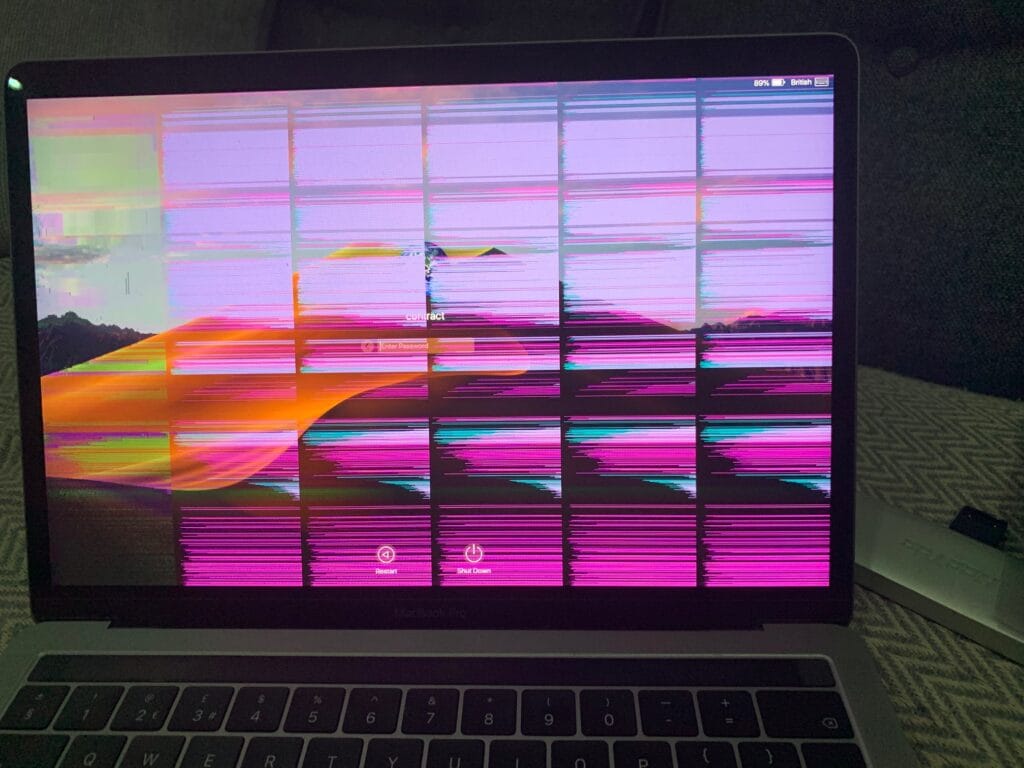
The screen flashes, strobes, or rapidly cycles through corrupted images. Sometimes only at a specific lid angle. Sometimes constantly. Sometimes only during demanding applications.
Probable cause: If it changes with lid angle — almost certainly the display cable or backlight flex cable. If it happens regardless of angle but worsens under GPU load — that points more to GPU instability.
Repair path at KissMyMac®: Lid-angle dependent = cable repair. GPU-related = component-level logicboard work. We confirm which with Apple Service Toolkit diagnostics before touching anything. Visit our Macbook Screen Replacement Page for more about Macbook LCD Replacement for Macbook Screen Lines Repair.
Symptom 8 — Image Burn-In, Retention, or Persistent Ghosts
You see a faint outline of an old image — your menu bar, a Finder window, the dock — even after moving on to something else. Sometimes it fades after a few minutes. Sometimes it stays permanently.
Probable cause: LCD image retention. On older MacBook Pro panels, prolonged display of static elements at high brightness causes uneven pixel ageing. This is not a cable or GPU issue — it is purely the panel degrading.
Try this first: Set an all-grey image as your desktop wallpaper and leave it for a few hours. Mild retention cases sometimes recover on their own.
Repair path at KissMyMac®: Mild retention — try the grey screen test first. Moderate to severe — LCD panel replacement. We will tell you honestly which camp your machine is in.
Software or Hardware? Run This Checklist First
Before committing to any physical repair, we always run the cheap-first checks. These are standard KissMyMac® intake steps — climb each rung before assuming hardware is at fault.
- Restart and observe. A kernel panic during a graphics-heavy process can leave a corrupted frame buffer that looks exactly like a hardware fault. A clean restart costs nothing.
- SMC reset (System Management Controller — handles power delivery and display management). Intel Macs: hold Shift + Control + Option + Power for 10 seconds. Apple Silicon: shut down and wait 30 seconds. See Apple Support for model-specific steps.
- NVRAM reset (Intel Macs only). Hold Option + Command + P + R during startup. Clears display and resolution settings. See Apple Support for confirmation your model is supported.
- Safe Boot. Hold Shift on Intel startup, or hold Power on Apple Silicon and choose Safe Mode. If symptoms disappear in Safe Mode — you have a software or driver problem, not hardware. This happens more often than you would think.
- External display test. Plug in via USB-C, HDMI, or Thunderbolt. External clean = GPU and logicboard are healthy, fault is display-side. External also broken = fault is upstream. This one step tells you more than any visual inspection.
- Book a free diagnostic at KissMyMac®. Once the ladder is exhausted, bring it in. We use Apple Service Toolkit and component-level testing to isolate exactly which part has failed. No commitment. No charge.
Hard rule from the bench: Do NOT open the display, pry the panel, or attempt to re-seat the cable yourself. The display data cable on modern MacBooks is fragile. The panel is bonded with adhesive. One wrong move turns a RM900 cable job into a RM3,500 logicboard problem. We see this every month — sometimes every week. It is not worth it.
Repair or Replace? Our Honest Take
| Situation | Our Verdict | Why |
|---|---|---|
| LCD lines or artifacts on a 2020+ MacBook | Repair | LCD panel replacement only. The machine has years of life left. |
| Black screen with backlight on, 2016–2020 MacBook | Repair | Cable or LCD. Logicboard is usually healthy. |
| Completely black screen, Intel-era Pro | Repair (component-level) | Backlight circuit repair — we do what others charge RM4k–RM8k for. |
| GPU artifacts on a 2012–2015 MacBook Pro with discrete GPU | Honest conversation | We will quote, but at this age you may be better off with a newer machine. We will tell you straight — we would rather you save your money. |
| Cracked panel + dented housing | Full assembly repair | LCD-only is not viable when housing is physically dented. |
| Flexgate on out-of-warranty 2016/2017 13″ Pro | Repair (cable) | Apple’s extended programme expired. We still fix it for a fraction of full assembly cost. |
MacBook Screen Repair Cost in Malaysia — Honest Ranges
All pricing below is indicative. Final price is confirmed after our free diagnostic — we never commit to a number until we have physically inspected the machine. This is not us being evasive. It is us being honest. A quote without an inspection is just a guess.
| Repair Type | Typical Range | When It Applies |
|---|---|---|
| Cable-only repair (display data or backlight cable) | RM450 – RM900 | Coloured bands, lid-angle dependent flicker, flexgate |
| LCD panel only (no housing damage) | RM900 – RM2,300 | Vertical/horizontal lines, ghosting, retention, dead panel with backlight |
| Full display assembly (dented or bent housing) | RM1,400 – RM4,000 | Drop damage, bent lid, severe pressure cracking |
| Backlight circuit component repair | RM800 – RM2,500 | Completely black, no backlight — Intel-era MacBook Pros |
| GPU / logicboard component repair | RM1,200 – RM3,500 | External display also broken, GPU artifacts under load |
Compare that to Apple’s standard approach — full display assembly swap at RM1,800–RM4,000+, or full logicboard replacement at RM4,000–RM8,000+. That gap is exactly why component-level repair exists, and why we built KissMyMac® around it. For anyone curious about the underlying hardware, iFixit’s MacBook teardowns show exactly what goes into these display assemblies — and why LCD-only replacement is viable when the housing is intact.
Why KissMyMac®?
We are an Apple Certified Independent Repair Provider — Apple’s programme for independent shops that meet their technical and parts standards. Genuine Apple panels, genuine Apple diagnostic tools, trained and verified technicians.
But the certification is the baseline. Here is what we actually stand for.
- FREE diagnosis. No Fix, No Pay. You only pay if we successfully repair the machine. If we cannot fix it — you walk out paying nothing, no questions asked.
- Component-level repair. We replace backlight ICs, re-seat connectors, repair flex cables — not just swap full assemblies the way Apple defaults to.
- LCD-only replacement whenever housing is undamaged. Saves you RM500–RM1,500 vs full assembly, every time.
- Your data stays untouched. A screen repair never goes near your SSD. Not a single file.
- Honest advice. If your machine is not worth repairing, we will tell you that too. We would rather lose the job than have you spend money that does not make sense.
- Three locations: Taman Desa (KL), Damansara Uptown (PJ), and Seremban.
We only fix Macs — not Windows, not Android, not printers. Just Macs. That focus is the only way to be genuinely good at this.
FAQ
Why does my MacBook screen have lines but the external monitor is fine?
That is a near-perfect signal that the fault is on the display side — either the LCD panel or the display data cable. Your GPU and logicboard are healthy. At KissMyMac® we confirm with a free diagnostic, then quote LCD-only or cable-only repair. External fine = display fault. Always.
Can vertical lines on a MacBook be repaired without replacing the full display?
In most cases, yes. If the aluminium housing is not physically dented, we do LCD-only replacement — keeping your housing, hinges, webcam, and antenna. This saves RM500–RM1,500 vs Apple’s full assembly approach.
My MacBook screen is black but I can hear the startup chime. Is the logicboard dead?
Not necessarily. If the screen is glowing (look closely from a steep angle — you should see faint light) but showing no image, it is usually a display cable or LCD panel problem. If the backlight is completely off and the screen is fully dark, it is more likely the backlight circuit on the logicboard — which we repair component-level. Either way, not necessarily a dead board.
Is this screen flicker on my 2017 MacBook Pro flexgate?
Possibly. Classic flexgate signs: a stage-light effect glowing up from the bottom of the screen, or a backlight that only works at certain lid angles. We confirm in the free diagnostic. It is a known issue on 2016/2017 13″ Pro models and something we fix regularly.
How long does MacBook screen repair take in Malaysia?
LCD-only repairs at KissMyMac® complete in 3–5 hours. Cable and backlight component repairs are often same-day to next-day. Full assembly orders depend on parts availability.
Will I lose my data during a screen repair?
No. Screen, cable, and backlight repairs never touch your SSD. Your files, folders, apps, and settings are exactly as you left them. If your case ends up requiring logicboard work — we will tell you separately and take every precaution.
Should I just buy a new MacBook instead?
Honest answer: depends. A 2020+ MacBook with only a screen problem is almost always worth repairing — the machine still has a lot of life left in it. A 2014 MacBook Pro with a GPU fault is a tougher conversation — we will tell you straight whether it makes financial sense. No pressure either way.
One thing worth knowing as you decide: Apple Silicon MacBooks (M1 and later) are showing a different display failure profile compared to Intel-era machines. Fewer flex cable failures — the hinge engineering is more robust — but we are seeing a higher incidence of panel-level defects on the M3 Pro and M3 Max models, and genuine Apple Silicon panels cost more than their Intel equivalents. That said, the machines themselves last longer and hold resale value better, which makes repair economics more favourable on the newer generation. If you are on an M-series Mac with a display fault, repair almost always makes financial sense.
Lines, bands, ghosting, flicker, completely black — every one of these has a path back to a working machine. You do not have to guess, and you do not have to pay Apple-level prices for a repair that should not cost anywhere near that much.
KissMyMac® — Apple Certified Independent Repair Provider in Malaysia.
- WhatsApp us a photo of your screen and we will give you an honest first-look assessment, free.
- Walk in to Taman Desa (KL), Damansara Uptown (PJ), or Seremban.
- FREE diagnosis. No Fix, No Pay.
A working Mac is a happy Mac — and we have been making Macs happy in Malaysia for over 10 years. Let us take a look.
Ready To Get your Macbook Screen Diagnosed?
Honest answer: depends. A 2020+ MacBook with only a screen problem is almost always worth repairing — the machine still has a lot of life left in it. A 2014 MacBook Pro with a GPU fault is a tougher conversation — we will tell you straight whether it makes financial sense. No pressure either way.
Written By:-
I am the KissMyMac® Malaysia Technician, an Apple Certified Technician at KissMyMac with More than 8 Years Of Experience In The Apple Repair Industry. We specialize in Macbook Repair & Upgrade, iMac Repair, iPhone Repair, iPad Repair in KissMyMac. We have dealt with more than 30,000+ Apple repairs throughout our years working in this industry, from a small repair shop to where we are now with 3 branches across Malaysia – KissMyMac Kuala Lumpur, KissMyMac Petaling Jaya, and KissMyMac Seremban