

TL;DR
- Many flicker causes (cable, connector, backlight, logicboard) are fixed at component level — no full screen swap. But when the LCD panel itself has failed, a display replacement is the only honest fix
- If the flicker changes when you tilt the lid, it’s almost always a display cable issue — not the panel, and far cheaper to fix
- MacBook screen flickering is almost always a hardware fault — software resets and macOS updates rarely fix it for good
- KissMyMac® MacBook Screen flickering repair ranges RM450–RM2,200. FREE diagnosis first, then you decide
Why Is My MacBook screen flickering, glitching, or showing weird lines that come and go — don’t panic, and please don’t just live with it. We get calls and walk-ins about this every single week at the KissMyMac®. Some of them waited months hoping it would sort itself out. It didn’t.
Here’s the honest starting point most people get wrong: MacBook screen flickering is almost always a hardware problem, not software. In 10+ years on the bench we can count the genuine “software” flicker cases on one hand. So MacBook screen flickering repair Malaysia usually means anything from a quick component-level cable repair to logicboard micro-soldering — and sometimes, yes, a full display replacement. The trick is knowing which one you’re dealing with — *before* you spend money on the wrong solution, or let a shop talk you into a full screen swap you may not need.
We’re an Apple Certified Independent Repair Provider, and over 10+ years we’ve seen every flicker pattern you can imagine. Here’s the breakdown.
Why Is My MacBook Screen Flickering? 6 Real Hardware Causes (And When To Repair vs Replace)
Table of Contents
Every one of these is a hardware fault. We have yet to meet a flickering MacBook that a software update genuinely fixed for good — so if a forum told you to “just reinstall macOS,” that’s almost never the real answer.
1. GPU / Graphics Chip Failure (Heat & Solder Fatigue)
Symptom: Flicker flares up when the Mac is under load — heavy apps, video export, gaming — or when an external monitor is plugged in. Often gets worse once the machine heats up, and may come with artifacts or coloured squares.
Repair path: Hardware-level. Heat stress on the GPU (a.k.a. the graphics chip on your logicboard) is the usual culprit — dried-up thermal compound makes the chip run hot and throttle wildly, which shows up as flicker. On some models the solder joints under the chip fatigue after years of heat cycling. We re-paste and service the cooling, and where the chip itself is at fault we repair it at board level — not a “swap the whole logicboard” job.
Note: Malaysia’s heat and humidity accelerates thermal paste degradation faster than in colder countries. If your MacBook is more than 3 years old and you’ve never had it serviced internally, this is worth checking regardless of the flicker.
2. Display Cable Wear (Flexgate-Style Damage)
Symptom: Flickering or backlight dimming when the lid is at certain angles. Worse when you tilt the screen forward. Sometimes a thin bright bar appears across the bottom edge of the screen.
Repair path: Cable-level repair. This is the classic Flexgate issue (a.k.a. the display flex cable problem) from 2016–2018 MacBook Pros, but we still see versions of it on newer models too. We replace the affected flex cable — far cheaper than a full display swap.
Note: Apple did extend coverage for some affected models under its 13-inch MacBook Pro Display Backlight Service Program, but that window has long closed for most. If you have a 2016–2018 MacBook Pro with this exact symptom, mention it when you WhatsApp us — we’ll check if there’s still any coverage before we quote anything.
3. Loose Or Damaged Display Connector On The Logicboard
Symptom: Random flicker, lines, or full screen blackout that comes back when you press near the hinge area. Common after a drop or a liquid spill near the top section of the keyboard.
Repair path: Logicboard-level micro-soldering. The display connector pads can lift after impact. This is exactly the kind of repair Apple Authorised Service Providers won’t do — they’ll quote you a full logicboard swap instead. We repair the connector itself at component level. Big difference in price — see our MacBook logicboard repair guide for how component-level work compares to a full board replacement.
4. Failing Backlight Circuitry
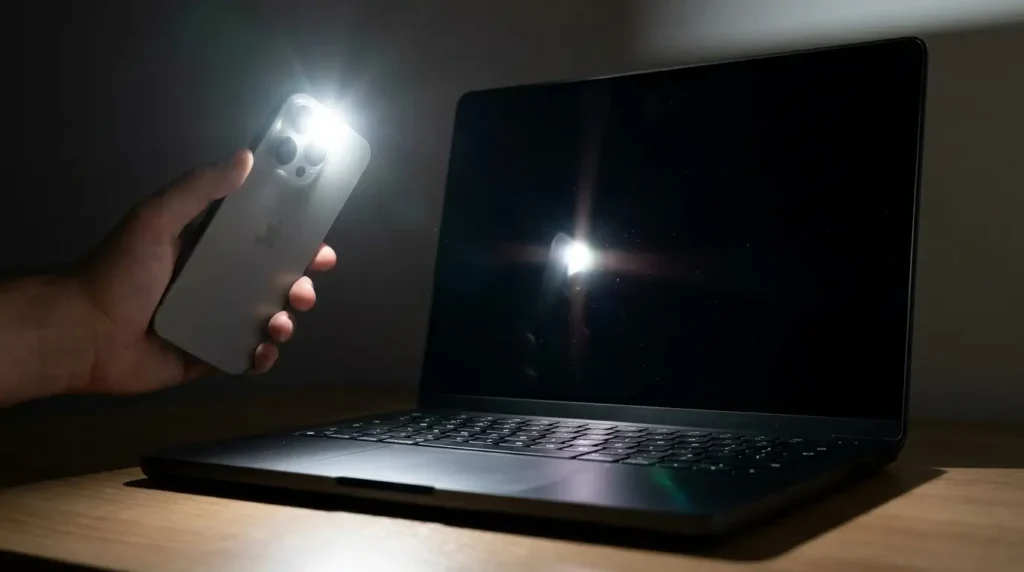
Symptom: Screen flickers between bright and dim. You can still see content faintly when you shine a torchlight on the panel — meaning the LCD panel itself is fine, but the backlight is dying.
Repair path: Backlight IC and fuse-level repair on the logicboard (a.k.a. the backlight chip). Again, component-level work — no need to throw out the entire display assembly for this. If your flicker is specifically a backlight problem, we go deeper into it on our [MacBook screen backlight repair guide](Macbook-Screen-Backlight-Repair-Malaysia.md).
5. Liquid Damage (Even From Months Ago)
Symptom: Intermittent flicker that’s gotten progressively worse over weeks. You may have spilled coffee, milo, teh tarik, or just a few drops of water — even months ago, dried it off, thought you got away with it. We hear this story almost every week.
Repair path: Logicboard cleaning, corrosion treatment, and trace repair. Liquid damage is a slow killer. The corrosion creeps along the display power lines until something finally gives. The earlier you catch this, the cheaper the fix — and we mean significantly cheaper.
Note: In Malaysia’s humidity, even a small spill corrodes faster than you’d expect. If you suspect any liquid contact at all, don’t wait.
6. Physical Panel Damage (Cracked Or Pressure-Damaged LCD)
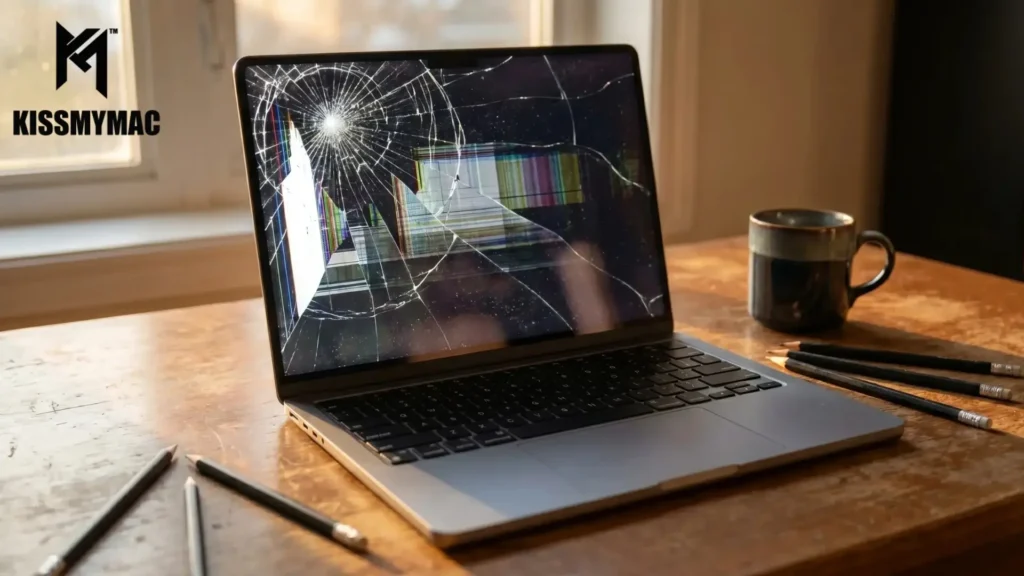
Symptom: Flickering combined with visible cracks, ink-like blotches, or coloured lines/bands that don’t change when you tilt the lid. The flicker is permanent and getting worse.
Repair path: This is the one flicker cause where the panel itself is gone — and an LCD can’t be repaired, it has to be replaced. There’s no honest way around it. If that’s your situation, we handle full display replacement (genuine vs aftermarket panels, cost, turnaround) on our dedicated MacBook screen repair & replacement page — and we’ll always tell you straight whether a swap is genuinely needed, or whether a shop is upselling you.
How To Narrow It Down Yourself (Gently — Then Stop)
You can’t fix flicker at home, but four quick checks help us — and you — point at the likely cause before you bring it in. Do them gently, once each.
- Disconnect any external display or dock — rules out a bad HDMI cable or adapter feeding the flicker
- Tilt test (gently, ONCE) — if the flicker changes with the lid angle, it’s the display cable
- Torch test — shine a torchlight on a “black” screen. If you can see the desktop faintly, the backlight circuit is the problem, not the panel
- Note the trigger — does it flare up when the Mac gets hot, under heavy apps, or only after a knock or spill? That single detail often points us straight to the cause
One honest warning: SMC/NVRAM resets and Safe Mode almost never fix flicker, because flicker is almost always hardware. Don’t lose days chasing software resets — and every extra flex of the lid shortens a worn cable’s life. Book a FREE diagnosis instead.
Repair Or Replace The Display? The Honest Answer
Here’s the part most shops won’t tell you: a flickering screen is not automatically a screen replacement.
Many flicker causes live in the cable, connector, backlight circuit, or logicboard — and those we fix at component level, without touching the panel. That’s far cheaper than a full display swap, and it’s exactly the work Apple Authorised Service Providers and most third-party shops won’t do. They’d rather quote you the whole assembly.
But we won’t pretend it’s always avoidable. When the LCD panel itself is the fault — cracks, pressure damage, a dead backlight matrix — a display replacement is the only honest fix. No amount of board-level work brings a dead panel back, and any shop telling you otherwise is selling you something.
So the real answer is: it depends entirely on the diagnosis. If a shop quotes you a full display replacement for a flicker that changes with lid angle, that’s a cable — and you’re being overcharged. Get a second opinion. If you genuinely do need a replacement, we’ll show you exactly why, and we’ll still come in well under Apple’s price. For the full replacement breakdown, see our MacBook screen replacement cost.
That upsell-for-a-cable is the kind of thing we see customers walk in with every month. Sometimes they’ve already paid elsewhere. That’s the part that really frustrates us.
What Does Fixing Each Cause Cost?
Rough ranges at KissMyMac® so you know what to expect — final price always after a FREE diagnosis, because we don’t quote blind.
These are the typical ranges at KissMyMac®. Final price after FREE diagnosis — we don’t quote blind.
| Repair Type | Estimated Cost (RM) |
|---|---|
| Display cable / Flexgate-style repair | RM650 – RM1,200 |
| Backlight IC or component-level logicboard repair | RM600 – RM1,500 |
| Display connector micro-soldering | RM800 – RM1,800 |
| GPU / graphics chip board-level repair | RM800 – RM2,200 |
| Liquid damage (logicboard clean + trace repair) | RM800 – RM2,200 |
| LCD / display replacement (panel itself failed) | RM700 – RM2,200 |
We open it, we test it, we show you what we find, then you decide. No pressure, no surprise bills. When you’re ready for an exact quote and a booking, head to our MacBook screen flickering repair page — every job starts with a free diagnosis.
Why KissMyMac® For MacBook Screen Flickering Repair
We’re an Apple Certified Independent Repair Provider — which means access to Apple Diagnostic Tools, genuine Apple parts, and the training that most third-party shops simply don’t have. (You can verify any Apple repair provider directly with Apple before you trust them with your Mac.)
More importantly, we do component-level logicboard repair. That’s where some of the MacBook Screen flickering issues actually live. Most Apple Authorised Service Providers (and some third-party shops) won’t open the logicboard — they just swap the whole thing. We repair the actual component. Connector, chip, trace — whatever it is. That’s why our prices are usually lower for the same outcome.
- No Fix, No Pay on most flicker repairs
- Your data stays untouched — flicker repairs don’t go anywhere near your SSD
- Three locations across the Klang Valley and Negeri Sembilan — Taman Desa (KL), Damansara Uptown (PJ), and Seremban
- 10+ years and thousands of MacBooks through our bench
We’re not above you, not below you. Just the technicians next door who’ve seen this exact problem before — probably hundreds of times. We want to give you the honest answer, even if that answer is “not worth fixing, consider replacing.”
FAQ — MacBook Screen Flickering Repair Malaysia
Why is my MacBook screen flickering all of a sudden?
Sudden flicker is almost always hardware — most often a loose or worn display cable from a knock, an overheating graphics chip, or early backlight failure. It’s rarely software, whatever the forums tell you. The fastest way to know which is a FREE diagnosis at KissMyMac® — we test the common hardware causes in under 30 minutes.
Can a flickering MacBook screen be repaired without replacing it?
Often, yes — but not always. When the cause is a cable, connector, backlight circuit, or logicboard component, we repair it without touching the panel, and you keep your original screen. But when the LCD panel itself is failing, a display replacement is genuinely required — a dead panel can’t be repaired. A FREE diagnosis tells you exactly which camp your MacBook is in before you spend a cent.
How much does MacBook screen flickering repair cost in Malaysia?
At KissMyMac®, MacBook screen flicker repair typically ranges from RM450 for a component-level cable repair to RM2,200 for liquid-damage board work or a full display replacement. Final price after FREE diagnosis — we don’t give quotes before we open it.
Is MacBook screen flickering covered under AppleCare?
Sometimes yes — especially for known issues like Flexgate on certain 2016–2018 MacBook Pro models. But once the warranty window has closed, Apple typically quotes a full display assembly replacement. As an Apple Certified Independent Repair Provider, we can usually fix the underlying cause for far less. Worth checking before you go the Apple route.
Does flickering mean my MacBook is dying?
Not necessarily. Flicker is a symptom, not a death sentence. In our experience, most flickering MacBooks have years of life left in them once the actual cause is fixed — the trick is catching it before the problem spreads further into the logicboard.
Will I lose my data during MacBook flicker repair?
No. Flicker repairs don’t touch your storage at all. Your SSD is physically separate from the display assembly and the logicboard areas we work on. Not a single folder lost.
How long does MacBook flicker repair take?
Component-level cable repairs are usually 1–2 working days. Logicboard work (connector resoldering, backlight IC, GPU, liquid damage) takes 2–5 working days depending on parts and severity. A panel/display replacement depends on parts availability — we confirm timing after the FREE diagnosis.
Stop The Flicker. Book A FREE Diagnosis.
Don’t run the tilt test 50 times hoping it sorts itself out. Every flex makes a cable issue worse, and every reboot during a liquid-damage flicker pushes corrosion further into the logicboard.
WhatsApp KissMyMac® a photo of your screen — we’ll give you a likely cause before you even leave the house.
FREE diagnosis. Genuine Apple parts. No Fix, No Pay. Your data, untouched.
A flicker-free Mac is a happy Mac — let’s get yours back. 🙂
Authored By
I am the KissMyMac® Malaysia Technician, an Apple Certified Technician at KissMyMac with More than 8 Years Of Experience In The Apple Repair Industry. We specialize in Macbook Repair & Upgrade, iMac Repair, iPhone Repair, iPad Repair in KissMyMac. We have dealt with more than 30,000+ Apple repairs throughout our years working in this industry, from a small repair shop to where we are now with 3 branches across Malaysia – KissMyMac Kuala Lumpur, KissMyMac Petaling Jaya, and KissMyMac Seremban