
Produced By the KissMyMac® Repair Team — Apple Certified Independent Repair Provider · Last verified: June 2026
Your MacBook is throwing “startup disk almost full” warnings. Or it feels slow and someone told you an SSD upgrade will fix it. Before you spend a single ringgit on a MacBook SSD upgrade Malaysia owners need the full picture — because not every MacBook can have its SSD upgraded the same way. Some swap out easily. Some need micro-soldering. Some have hard capacity limits. Getting this wrong wastes time and money.
This guide covers which MacBook models qualify for an SSD upgrade, what one costs in Malaysia, and what to do if yours can’t be upgraded. It is not a DIY tutorial — SSD work on a modern Mac is a workshop job, and this article explains why.
TL;DR
- MacBook Air 2012–2017 and MacBook Pro 2012–2015 use replaceable SSDs — the most straightforward upgrade path.
- Intel MacBooks from 2016 onwards have soldered SSDs upgradeable via micro-soldering, but the T2 Security chip caps the maximum capacity. Example: a MacBook Pro 13″ 2019 with 128GB or 256GB can go up to 512GB — but a 512GB model cannot reach 1TB.
- Apple Silicon Macs (M1, M2, M3, M4, M5) can have their SSD upgraded via micro-soldering — a specialist service requiring advanced equipment.
- MacBook SSD Upgrade Malaysia Cost ranges from RM550 to RM4500 depending on your model and target capacity. FREE diagnosis first — no commitment required.
Table of Contents
Fact 1: Most Modern MacBooks Have Soldered SSDs — But Upgrades Are Still Possible
When people hear “SSD upgrade,” they picture swapping out a hard drive like in an old Windows laptop — pull out the old one, slot in a bigger one, done. Apple MacBooks does not work that way.
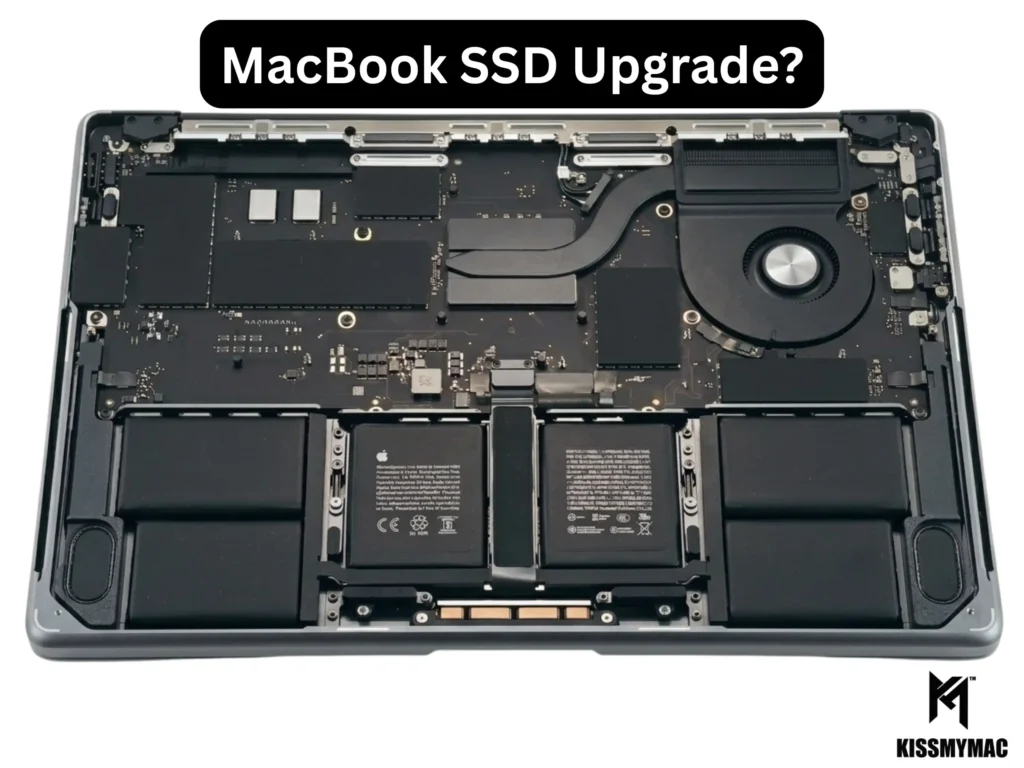
Since around 2016, Apple solders the SSD chips directly onto the logic board. Not a replaceable slot. Not a connector you can unplug. Actually soldered — bonded at the circuit level.
The good news: soldering can be reversed by a specialist. Intel MacBooks from 2016 onwards can have their NAND chips (the physical memory modules that store your data) replaced through micro-soldering — a precise, chip-level repair that lifts the old soldered storage off the board and bonds a higher-capacity replacement in its place. But the T2 Security chip Apple introduced limits the maximum capacity the Mac will recognise. Apple Silicon Macs (M1 and later) are also upgradeable via micro-soldering, though the process requires more advanced equipment and expertise.
We see customers every week who arrive with a fixed idea of what is or is not possible — often told the wrong thing by a friend or a nearby tech shop. The real situation is more nuanced than a flat yes or no, and that is exactly why we run a FREE diagnosis before quoting anything.
Fact 2: Which MacBook Models Have Upgradeable SSDs?
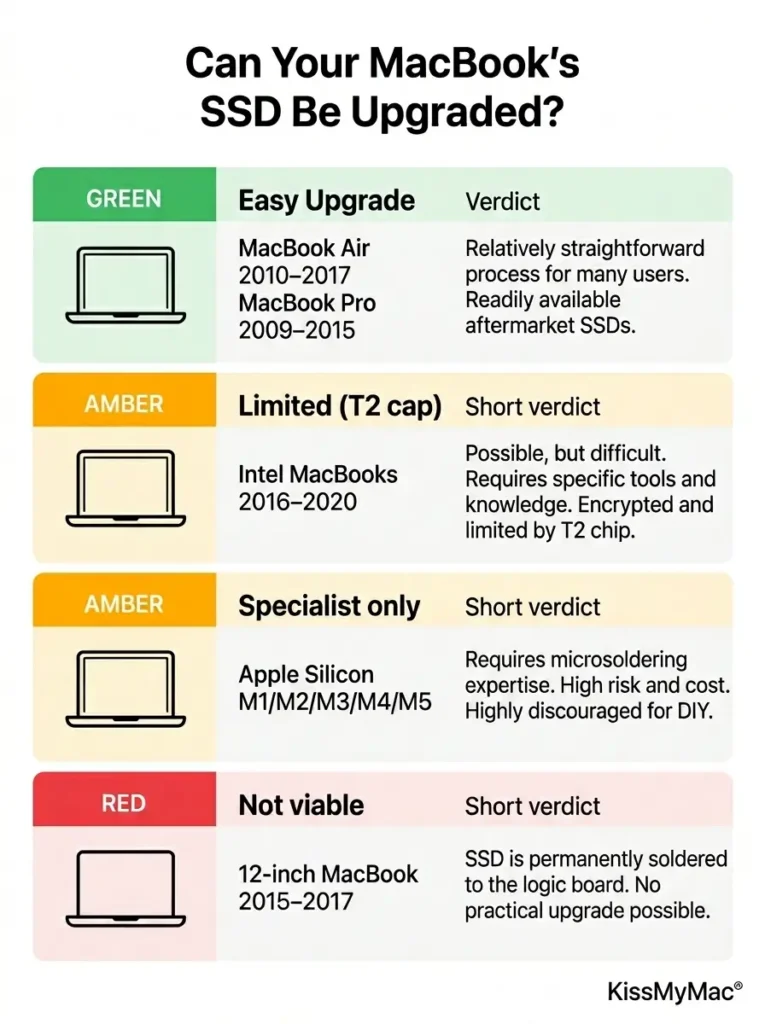
So is MacBook SSD upgradeable in your case? It comes down to two things: the year your machine was made and the chip inside it. Here’s the full breakdown.
| MacBook Model | SSD Upgradeable? | SSD Type |
|---|---|---|
| MacBook Air 2010–2011 | ✅ Yes | Proprietary SATA blade |
| MacBook Air 2012–2017 | ✅ Yes | Apple proprietary PCIe blade SSD |
| MacBook Air 2018–2020 (Intel, T2 chip) | ⚠️ Yes, Limited | Micro-solder upgrade; T2 chip caps max capacity |
| MacBook Air M1/M2/M3/M4/M5 (Apple Silicon) | ✅ Yes, done by Specialist | Upgradeable via micro-soldering |
| MacBook Pro 13″/15″ Non-Retina 2009–2012 | ✅ Yes | Standard 2.5″ SATA — easiest to upgrade |
| MacBook Pro Retina 13″/15″ 2012–2015 | ✅ Yes | Apple proprietary PCIe blade SSD |
| MacBook Pro 2016–2020 (Intel, T2 chip) | ⚠️ Yes, Limited | Micro-solder upgrade; T2 chip caps max capacity |
| MacBook Pro M1/M2/M3/M4/M5 (Apple Silicon) | ✅ Yes, done by Specialist | Upgradeable via micro-soldering |
| MacBook 12-inch (2015–2017) | ❌ No | Soldered — upgrade not viable |
Quick eligibility check — find your situation in 5 seconds:
- Bought 2017 or earlier? → A straightforward blade or SATA upgrade ✅
- 2018–2020 Intel (T2 chip)? → Upgradeable by micro-soldering, but capped by the T2 chip ⚠️
- M1/M2/M3/M4 (2020 onwards)? → Micro-soldering only — a specialist job ⚠️
- 12-inch MacBook (2015–2017)? → Not viable; consider the alternatives in Fact 5 ❌
The two most common requests we handle are a MacBook Air SSD upgrade Malaysia owners running 2012–2017 models want, and a MacBook Pro SSD upgrade Malaysia customers with 2015 Retina or Intel T2 machines ask about. The MacBook Air 2012–2017 and MacBook Pro Retina 2012–2015 use Apple’s proprietary blade SSD connector — not standard M.2 drives from any computer shop. iFixit’s teardown guides confirm these drives are incompatible with common M.2 modules without an adapter, and that SATA-era (2012–2013) and PCIe-era (2014–2015) blades are not interchangeable. They require specific upgrade kits and proper installation.
T2 chip upgrade limits (Intel 2016–2020 models): The T2 Security chip controls which storage capacities the Mac will recognise. The maximum upgrade depends on the original storage tier. For example, a MacBook Pro 13″ 2019 with 128GB or 256GB can be upgraded to a maximum of 512GB — but a MacBook Pro 13″ 2019 that shipped with 512GB cannot be upgraded to 1TB. We confirm your exact upgrade ceiling during the FREE diagnosis.
Even for eligible models, this is not a DIY job.
Find your model year: Apple menu → About This Mac, or use Apple’s official model identifier to confirm exactly which MacBook you have.
The bigger picture: every MacBook Apple has released since 2018 either has soldered storage or a T2-imposed capacity limit — a simple drive swap only works on models from 2017 and earlier. As Apple Silicon becomes the standard, micro-soldering is increasingly the only upgrade route, which means the technician’s chip-level capability — not just parts availability — now decides whether your Mac can grow.
From our workshop: roughly 7 out of 10 of the MacBooks customers bring to us hoping for a quick SSD swap turn out to be post-2016 soldered or T2 models that need micro-soldering instead.
Fact 3: How Much Does a MacBook SSD Upgrade Cost in Malaysia?
Here is the honest MacBook SSD upgrade cost Malaysia breakdown — parts and labour included, no hidden charges after the fact.
| Upgrade Path | Estimated Cost (RM) |
|---|---|
| 128GB → 256GB | RM550 – RM650 |
| 256GB → 512GB | RM750 – RM1,200 |
| 512GB → 1TB | RM1,400 – RM1,700 |
| 1TB → 2TB | RM1,700 – RM2,200 |
| 2TB → 4TB | RM2,200 – RM3,500 |
| 4TB → 8TB | RM3,500 – RM4,500 |
What affects the final price:
- MacBook Air 2012–2017 tends toward the lower end of each range — more parts availability
- MacBook Pro Retina 2012–2015 varies by connector generation (2012/2013 vs 2014/2015)
- MacBook Pro non-Retina (standard SATA) is generally the most affordable to upgrade
We always run a FREE diagnosis first — we confirm your exact model and upgrade path before quoting anything. Final pricing is set at diagnosis, not by guesswork.
Fact 4: Do You Actually Need an SSD Upgrade, or Just a Cleanup?
In our experience, a significant number of “I need more storage” problems are actually “I have not cleaned up in years” problems. Check yourself before committing to anything.
Signs you genuinely need more storage:
- “Startup disk almost full” keeps returning even after cleanup
- macOS updates and app installs fail regularly due to insufficient space
- You constantly move files to an external drive just to keep the machine usable
- Slowness is specifically when saving files, launching apps, or loading photos
Signs it might be something else:
- Mac is slow but still has 30GB+ free → RAM pressure, battery, or software issue
- Mac runs hot then slows → thermal or fan problem, not storage
- Constant beach ball with 30–40GB free → SSD degrading, not just full
Fact 5: If Your Mac Has a Soldered SSD, You Still Have Good Options
Even when a micro-solder upgrade is not the right call, you can still upgrade MacBook storage Malaysia-wide without touching the logic board. Here are three reliable routes.
Option 1: iCloud+ (from RM3.90/month)
If your work is mostly documents and photos, iCloud Drive moves the bulk off-device. Enable “Optimise Mac Storage” in System Settings → iCloud and your Mac keeps only recently accessed files locally. Per Apple’s current Malaysia pricing, iCloud+ is RM3.90/month for 50GB and RM11.90/month for 200GB.
Option 2: High-speed external SSD (RM350–RM650 for 1TB)
Samsung T7 or WD My Passport SSD via USB-C runs at near-internal speeds. Many professionals run creative apps off an external SSD without issues. Cheaper than an internal upgrade for most people.
Option 3: Migrate to a higher-spec Mac
If storage anxiety is constant, the machine no longer fits your needs. We migrate everything — every file, every app, every setting — to a new or refurbished Mac. Not a single folder lost.
Why Customers Choose KissMyMac® for MacBook SSD Upgrades
We are an Apple Certified Independent Repair Provider — access to Apple Diagnostics tools and genuine-quality parts, not the guesswork and knockoffs from generic tech shops.
- FREE diagnosis before any commitment — we confirm your model is upgradeable and give a firm quote
- No Fix, No Fee — if something goes wrong during the upgrade, you pay nothing
- Full data migration — your data is copied to the new SSD and verified before the old drive is removed
- Quality parts — no cheap SSD modules that fail six months later and corrupt your data
- Fast turnaround — most upgrades completed same-day or next day
If you have been searching for a MacBook SSD upgrade near me KL, we are in Taman Desa, with branches in Damansara Uptown (Petaling Jaya) and Seremban.
📍 KL (Taman Desa) · Damansara Uptown (Petaling Jaya) · Seremban
WhatsApp us your MacBook model and year — we will tell you upfront whether the upgrade is possible before you make the trip.
Frequently Asked Question
Can I upgrade my MacBook SSD myself?
Technically possible on eligible models, but not recommended. Proprietary blade SSD connectors are fragile — force the connector and you damage the logic board. Data migration without proper tools risks losing everything on your drive.
My MacBook Pro 2015 Retina has 256GB — can it be upgraded to 1TB?
Yes. The 2015 MacBook Pro Retina (both 13-inch and 15-inch) uses a PCIe blade SSD that can be upgraded. Bring it in for a FREE diagnosis and we will confirm the exact part and give you a firm quote.
How long does a MacBook SSD upgrade take?
Installation takes 1–2 hours. Data migration adds another 1–3 hours depending on how much you have. Most customers drop off in the morning and collect by the afternoon.
Do I lose my data during an SSD upgrade?
Not at KissMyMac®. We migrate all your data to the new SSD and verify it is complete before decommissioning the old drive. You leave with every file intact
Is an SSD upgrade worth it for a 2013 MacBook Air?
If the battery and display are healthy — yes. A storage upgrade can extend its useful life by 2–4 years for everyday work. Come in for a FREE diagnosis and we will give you an honest read on the full machine before you commit.
My MacBook Pro 2019 is running out of space. Can I upgrade the SSD?
Yes — the Intel 2019 model has a soldered SSD. We will need to order a new set of storage for the Macbook Pro 2019. But there are also rules for upgrading the SSD for MacBook Pro with Intel chip because they are controlled by T2 security chip, so there are limitations to the upgrade. For example, a MacBook Pro 13″ 2019 with 128GB/256GB can only upgrade to maximum 512GB. A Macbook Pro 13″ 2019 512GB cannot upgrade to 1TB.
Is SSD Storage Upgradeable for MacBook M1 and Later?
Yes. MacBook Air and MacBook Pro Running Apple Silicon M1, M2, M3, M4 or latest SSD can upgrade the SSD. The maximum can be upgraded to 4TB. But it all depends on the capability of each of the machine. We have upgraded a few MacBook Pro 14″ M3 and M4 to 2TB Storage.
About KissMyMac®
KissMyMac® is an Apple Certified Independent Repair Provider with workshops in Kuala Lumpur (Taman Desa), Petaling Jaya (Damansara Uptown), and Seremban. Our technicians diagnose and repair MacBook storage, battery, and logic-board issues every day — across Intel and Apple Silicon machines — using Apple Diagnostics and genuine-quality parts. This guide reflects that hands-on, in-workshop repair experience.
Reviewed and fact-checked by the KissMyMac® technical team. Pricing and model compatibility verified June 2026 and reviewed quarterly.
Not sure if your MacBook qualifies?
Start with a FREE diagnosis at KissMyMac®. We check your model, confirm whether an upgrade is possible, and give you a transparent quote before you commit to anything. No fix, no fee. No surprises.
Book a FREE Diagnosis → MacBook SSD Upgrades
Written By
I am the KissMyMac® Malaysia Technician, an Apple Certified Technician at KissMyMac with More than 8 Years Of Experience In The Apple Repair Industry. We specialize in Macbook Repair & Upgrade, iMac Repair, iPhone Repair, iPad Repair in KissMyMac. We have dealt with more than 30,000+ Apple repairs throughout our years working in this industry, from a small repair shop to where we are now with 3 branches across Malaysia – KissMyMac Kuala Lumpur, KissMyMac Petaling Jaya, and KissMyMac Seremban