

TL;DR: Is MacBook Pro 2016 worth repairing? Usually yes, if the problem is the battery, the screen backlight cable (flexgate), the Touch Bar, a minor short circuit, or the SSD on the 13-inch model without Touch Bar. It is usually NOT worth repairing if the CPU or T1 chip has failed, if it has serious liquid damage, or if other shops have already damaged the logic board.
Your MacBook Pro turns 10 this year. Happy birthday to it 🙂
However, birthdays are not the reason most 2016 owners walk into our shop. Usually it goes like this: the Mac suddenly cannot turn on, the owner panics, and the first thing they ask us at the counter is “Boss, habis already ah? Need to buy new one?” or “Is it still worth to repair this Macbook Pro 13″ 2016“?
So, is MacBook Pro 2016 worth repairing? From what we see at the counter, more often than you think, yes. About 5 out of 10 “dead” 2016s that come in turn out to be just the battery. But not every fault. Some repairs on this model are cheap and make total sense. Some, we will honestly tell you to let go.
In this article, we will go through the 7 faults we see most on the 2016 MacBook Pro, one by one, and give you our verdict for each: FIX, THINK TWICE, or DON’T FIX.
This article is for you if you own a 2016 MacBook Pro (13-inch or 15-inch), something has gone wrong, and you are deciding whether to fix it or let it go. It covers the 2016 MacBook Pro only, not other years and not step-by-step repair guides. Where we have a separate guide, we link to it.
Table of Contents
Is MacBook Pro 2016 Worth Repairing? First, Check Which Model You Have
Before anything else, you need to know which one you are holding, because the answer is different for each. Click the Apple logo () at the top-left of your screen, then About This Mac (Apple: Identify your MacBook Pro model).
| Model | Touch Bar | SSD | T1 chip | Our quick note |
|---|---|---|---|---|
| MacBook Pro 13-inch, 2016, Two Thunderbolt 3 Ports | No (normal function keys) | Removable | No | The easiest 2016 to repair (flexgate can still happen) |
| MacBook Pro 13-inch, 2016, Four Thunderbolt 3 Ports | Yes | Soldered on board | Yes | Common Touch Bar and flexgate cases |
| MacBook Pro 15-inch, 2016 | Yes | Soldered on board | Yes | The strongest of the three (more on this below) |
Note: If your Mac cannot turn on at all, you can find the model name printed in small text under the bottom case, or just bring it in and we will check for you. Diagnosis is FREE.
Quick words we use in this article:
- SSD: the storage chip that holds all your files, photos and apps.
- Logic board: the Mac’s main circuit board, where the CPU (the “brain”), the memory and, on Touch Bar models, the SSD sit on it.
- T1 chip: Apple’s security chip on the Touch Bar models. It runs Touch ID and the Touch Bar.
- Short circuit: electricity taking the wrong path on the board and burning a component, so the Mac cannot power on.
Is MacBook Pro 2016 Worth Repairing Now That Apple Calls It “Obsolete”?
In September 2024, Apple moved all three 2016 MacBook Pro models into its obsolete products list (9to5Mac, MacRumors). You can check the current status on Apple’s vintage and obsolete products page. In short, Apple no longer supplies parts or does hardware repairs for these models.
The one exception is the battery. Apple only offers battery-only repair on obsolete Mac laptops for up to 10 years after it last sold the model, and only while parts last (Apple). For the 2016, that window is closing, so genuine parts will only get harder to find from here.
Put those two things together: as Apple’s battery window closes, used 2016 prices also keep falling, so the 60% line in our Fix-or-Let-Go Verdict (explained below) gets harder to meet every year. If your 2016 needs a FIX-level repair, doing it sooner gives you more value than later.
On top of that, the 2016 MacBook Pro stops at macOS Monterey. Apple’s macOS Ventura compatibility list starts from the 2017 MacBook Pro, so the 2016 cannot officially install Ventura or anything newer.
However, “obsolete” does NOT mean “cannot be fixed”. It just means Apple will not fix it. As an Apple Certified Independent Repair Provider, we still repair these models every week, with genuine Apple parts where they can still be sourced and high-quality parts where they cannot. The real question is not can it be fixed, but should it be fixed. Let us see.
Is MacBook Pro 2016 Worth Repairing? Our Verdict, Fault by Fault
We call this the KissMyMac® Fix-or-Let-Go Verdict. We use the same three verdicts for every model year in this series, so you can compare.
✅ FIX = cheap relative to the value it gives you, worth doing
⚠️ THINK TWICE = depends on your situation, ask us first
❌ DON’T FIX = the money is better spent elsewhere
How the Fix-or-Let-Go Verdict decides: we compare your repair quote with what a working used 2016 of the same model sells for. If the repair costs less than about 60% of that, and the fault will not spread to other parts, we say FIX.
All prices are starting prices as of November 2026. Your final quote is confirmed after the FREE diagnosis.
1. Is MacBook Pro 2016 Worth Repairing for a Swollen or Draining Battery? FIX
Macbook Pro 13″ 2016 Battery Replacement Starts from RM509. This is our Number 1. And here is the funny part: a lot of 2016 owners who come in thinking their Mac is dead forever actually just have a battery failure. From our bench, about 5 out of 10 2016 MacBook Pros that come in because they “cannot turn on” turn out to be just the battery. The owner panics, and at the bench we find the battery has simply given up.
A battery is not a major defect. It is a wear-and-tear part, like the tyres on your car. Once replaced, your 2016 gets a proper second life for daily work.
Do NOT keep using a MacBook with a swollen battery. If your trackpad feels hard to click or the bottom case is bulging, stop using it and bring it in.
👉 If you are unsure whether your battery is the problem, check our guide on macbook battery replacement. And if your Mac is completely dead, see macbook won’t turn on first.
2. Is MacBook Pro 2016 Worth Repairing for Flexgate (Screen Goes Black Past 30 Degrees)? FIX
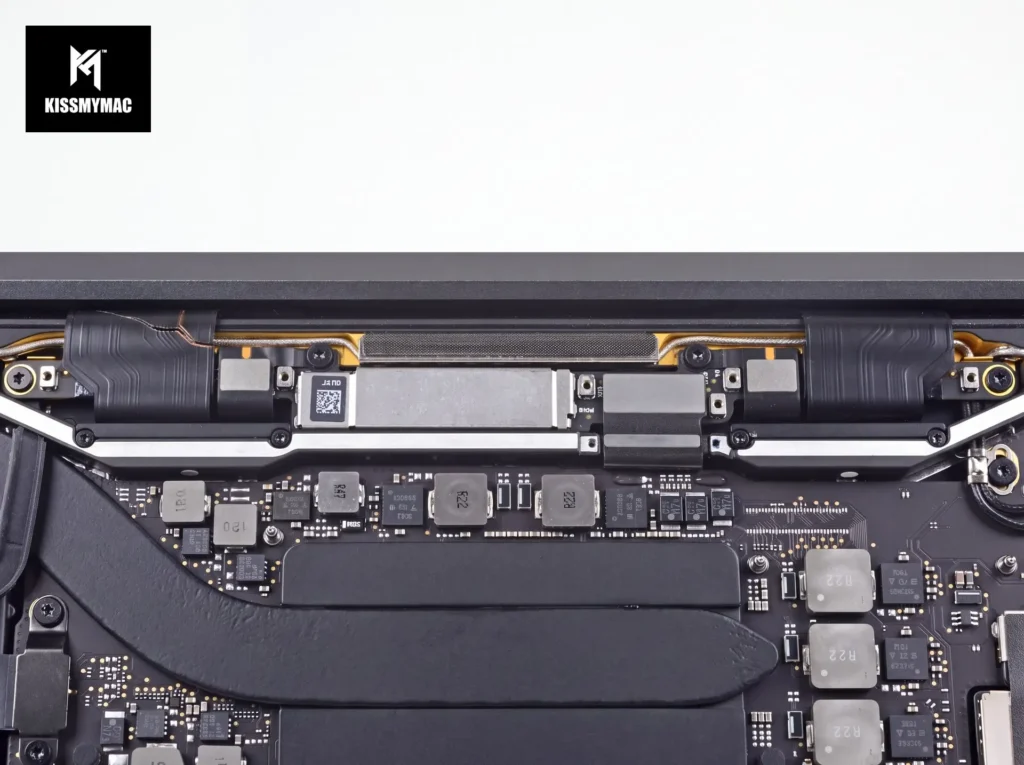
Macbook Flexgate Repair Starts from RM659. This one is very, very common on the 2016 MacBook Pro, including the 13-inch without Touch Bar. The screen works fine when the lid is half closed, at around 30 degrees. Open it wider, and the screen goes blank. Some people also see a “stage light” effect, with bright patches glowing at the bottom of the screen.
The cause is a design flaw. The screen backlight cable (a.k.a. the display flex cable) was manufactured shorter than it should be. Every time you open and close the lid, the cable gets stretched a little. After a few years, it cracks or snaps.
How we fix it: we dismantle the screen and replace the entire backlight cable, so the problem will not come back. We do NOT need to replace the whole screen. At RM659, it is still affordable for a 10-year-old Mac.
3. Is MacBook Pro 2016 Worth Repairing for a Dead or Flickering Touch Bar? FIX
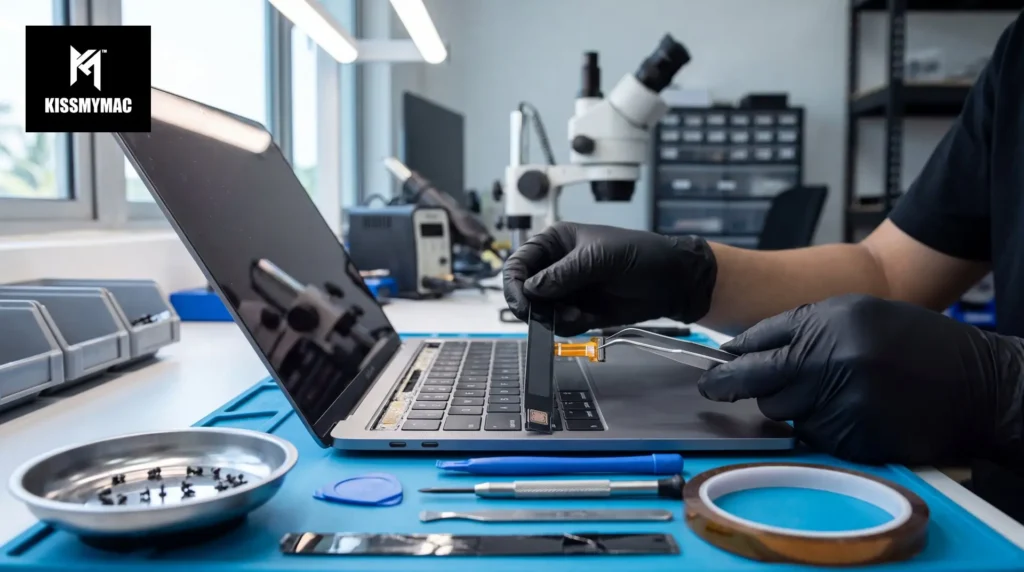
Macbook Pro 13″ Touch Bar Replacement Starts from RM459. We have to admit it: sometimes we drop our MacBook, or it takes a knock inside the bag. MacBooks are not Ironman. On the 2016, impact is the most common reason the Touch Bar starts flickering or goes completely dead.
Replacing the Touch Bar is not expensive, and it usually takes around 3 to 4 hours. In many cases, you can drop it off in the morning and collect it the same day.
4. Is MacBook Pro 2016 Worth Repairing for Sticky or Double-Typing Keys? THINK TWICE
You type “hello” and get “hhello”. Annoying, right?
All 2016 MacBook Pros use Apple’s butterfly keyboard (a.k.a. the super thin keyboard Apple introduced to make MacBooks slimmer). The keys travel very little, so even a tiny speck of dust or crumbs under a key can make it stick or type double.
Not every keyboard problem means a new keyboard. We always check the cheap fix first. Many times, the issue is just the key cap, and replacing it (from RM30) solves the double typing.
However, if we replace the key cap and the key still types double, that means the key mechanism underneath is damaged. That part cannot be repaired on its own, so the whole keyboard needs to be replaced, and on this model that is a much bigger job.
So our advice: try the key cap first. Only think about the full keyboard if the cheap fix does not work. A full keyboard replacement starts from RM459, and we will always confirm the quote with you before doing it.
👉 More on this in our macbook keyboard replacement page. (The RM250 starting price on that page is for older MacBook models. For the 2016, a full keyboard starts from RM459.)
5. Is MacBook Pro 2016 Worth Repairing for a Failing SSD? FIX or THINK TWICE
This depends on which model you have (remember the table above?).
MacBook Pro 13-inch, 2016 without Touch Bar: The SSD is removable. Replacing it is quite affordable, from RM550 depending on the size. An SSD failure here is definitely not a major problem. Verdict: FIX.
MacBook Pro 13-inch and 15-inch, 2016 with Touch Bar: The SSD is soldered directly onto the logic board. Replacing it takes much more labour, which requires finding the right part and also heavy duty soldering work. Verdict: THINK TWICE.
But fear not. In our experience running KissMyMac® for 10 years with more than 3000 5 stars in the MacBook Repair Industry, we have not seen many SSD failures on the 2016 Touch Bar models. The soldered SSD on these machines has been quite stable.
6. Is MacBook Pro 2016 Worth Repairing With No Power or a Logic Board Problem? It Depends
“Logic board problem” sounds scary, but it can mean many different things. This is where the diagnosis matters most.
FIX: minor short circuit. Based on what we encountered so far, many short circuits happen when people use a non-original charger or cable. When there is a power surge, it hits the MacBook, a component shorts, and the Mac cannot turn on. If the diagnosis shows it is just a short circuit, that is a very doable repair, and we would definitely recommend fixing it. Short circuit repair starts from RM659.
DON’T FIX: CPU or T1 chip failure. The Touch Bar models have Apple’s T1 security chip. Think of the T1 as a security guard at the gate: it must start up properly before the Mac is allowed to power on. If the T1 chip or the CPU itself has failed on a 10-year-old Mac, it is not worth fixing.
👉 For newer Macs where board repair still makes sense, see our macbook logicboard repair malaysia page.
7. Is MacBook Pro 2016 Worth Repairing After a Liquid Spill? Usually DON’T FIX
Liquid damage is always case by case. However, on the 2016 MacBook Pro, we see a pattern: when liquid gets in, it often hits the screen cable, which is connected directly to the CPU area of the logic board. When that happens, the CPU fails.
At that point, you are looking at replacing the entire logic board AND the entire screen. That costs around RM2,000 and above. For a 10-year-old Mac, we would not even ask you to consider it. That money can go towards a newer Mac.
Note: If you just spilled something, do NOT try to turn it on. Follow our first-aid steps for spilled water macbook, then let us check it. Not all spills end badly, and the FREE diagnosis will tell you which kind you have.
Is MacBook Pro 2016 Worth Repairing? The Verdict at a Glance
| Fault | Our verdict | Starts from | Why |
|---|---|---|---|
| Battery swollen or draining | ✅ FIX | RM509 | Wear-and-tear part, gives the Mac a second life |
| Flexgate (screen black past ~30°) | ✅ FIX | RM659 | Replace the cable, not the whole screen |
| Touch Bar dead or flickering | ✅ FIX | RM459 | 3 to 4 hours, not expensive |
| Sticky or double-typing keys | ✅ FIX | RM30 (key cap), RM459 (full keyboard) | Key cap first; full keyboard only if needed |
| SSD failing (13″ no Touch Bar) | ✅ FIX | RM550 | Removable SSD, affordable |
| SSD failing (Touch Bar models) | ⚠️ THINK TWICE | Ask us | Soldered, genuine parts hard to find |
| Short circuit | ✅ FIX | RM659 | Very doable repair |
| CPU or T1 chip failure | ❌ DON’T FIX | n/a | Not worth it on a 10-year-old Mac |
| Liquid damage hitting the CPU | ❌ DON’T FIX | RM2,000+ | Board AND screen need replacing |
Is MacBook Pro 2016 Worth Repairing After Other Shops Ruined the Board? The Repair We Talk People Out Of
Not every Mac that comes to us should be repaired, even if technically we could replace parts.
One 2016 MacBook Pro came to us after its logic board had been “repaired” by other shops many times. When we opened it, there were other shops’ markings all over the internals. The board was in such a bad condition that it was no longer repairable. It could only be replaced.
At that point, the cost to replace the board is not justifiable anymore for a 10-year-old Mac. So we told the customer straight: get a good used unit, or buy a new one.
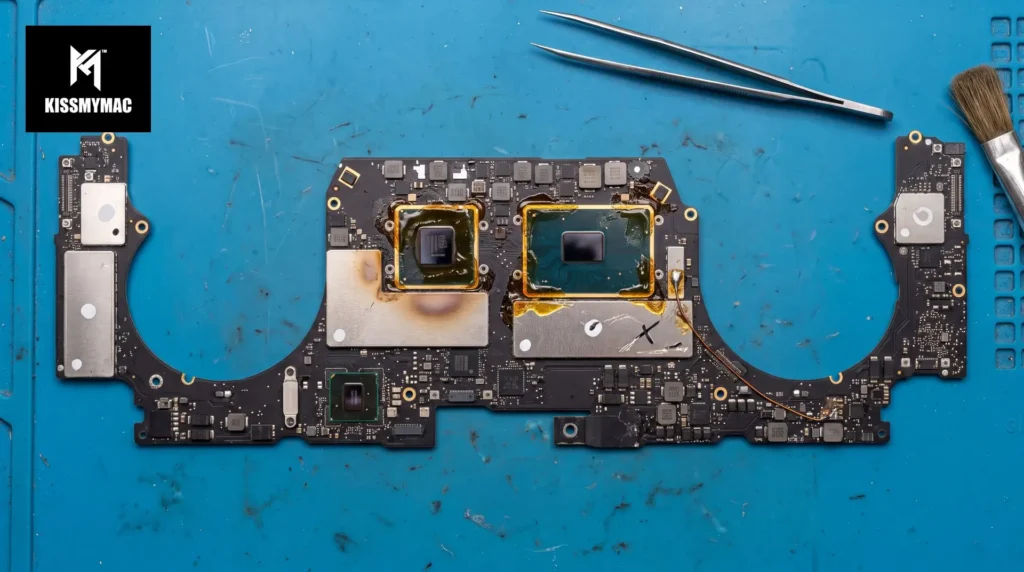
In short, a Mac that has been opened and “tried” by many shops is often harder (and more expensive) to save than a Mac that comes to us untouched. If your Mac has a problem, get a proper diagnosis first before letting anyone dig into the board.
Is MacBook Pro 2016 Worth Repairing? Which of the 3 Models We Would Keep
If you are choosing which old Mac in the house is worth saving, in our opinion, it is the 15-inch with Touch Bar. Every 15-inch 2016 came with an Intel Core i7 processor and 16GB of RAM (Apple Tech Specs), so it simply has more processing power than the 13-inch models. For a home Mac that still does documents, browsing and Zoom calls, it holds up better.
That said, if your 15-inch has one of the ❌ faults above, the model does not save it. The fault decides, not the size.
After Repairing Your MacBook Pro 2016: How to Make It Last Longer
Once your 2016 is fixed, here is what we tell every customer at the counter:
- Use the original Apple charger and the original Apple cable. Cheap chargers are one of the most common reasons we see short circuits.
- Do NOT keep it plugged in when you are not using it. In our opinion, leaving an old Mac charging all the time contributes to a bloated (swollen) battery.
- It is OK to use it while it charges. Just unplug when you are done for the day.
- Back up your files. A 10-year-old Mac can still work well, but do not keep your only copy of family photos on it. See our backup mac methods guide.
Is MacBook Pro 2016 Worth Repairing? What Happens When You Bring It In
- FREE diagnosis. Most of the time we can tell you on the spot. For more serious problems (like liquid damage or board faults), it can take 1 to 2 days.
- We tell you the verdict and the quote, in person or on WhatsApp, using the same Fix-or-Let-Go Verdict as this article.
- We only start after you say OK. No surprise charges. No Fix, No Fee.
- Repair. A Touch Bar takes around 3 to 4 hours. Most other repairs take 1 to 5 days, depending on the problem and parts.
- Collect your Mac, with a warranty from 3 months to 3 years, depending on the repair.
How we wrote this: Every price, repair time and bench story in this article comes from our own technicians at Taman Desa, Damansara Uptown and Seremban. We have been repairing MacBooks, including the 2016 MacBook Pro, since 2018. This article was reviewed by Ian Leong, Founder of KissMyMac® and Apple Certified Technician, on 10 November 2026. These verdicts come from what we see on our own bench, not a lab test, which is why the FREE diagnosis always comes first. Spot an error? WhatsApp us and we will correct it and note the change here.
Update log: 11 November 2026: first published.
Is MacBook Pro 2016 Worth Repairing? Frequently Asked Questions
Does Apple still repair the MacBook Pro 2016?
No. Apple moved all three 2016 MacBook Pro models to its obsolete list in September 2024, so Apple no longer supplies parts or does hardware repairs for them. Battery-only repair may still be offered while parts last. Independent repair providers like KissMyMac® can still repair them with genuine or high-quality parts.
Which MacBook Pro 2016 has a removable SSD?
Only the MacBook Pro 13-inch, 2016 and 2017 without Touch Bar (Two Thunderbolt 3 Ports) has a removable SSD. On the 13-inch and 15-inch Touch Bar models, the SSD is soldered onto the logic board, which makes replacement more difficult and more expensive.
Can a MacBook Pro 2016 run the latest macOS?
No. The MacBook Pro 2016 officially stops at macOS Monterey and cannot install Ventura or newer. It still works for daily tasks like documents, browsing and video calls, but it will not get the newest macOS features.
Is MacBook Pro 2016 worth repairing if it cannot turn on?
Usually yes. From our bench, about 5 out of 10 2016 MacBook Pros that “cannot turn on” actually just have a failed battery, which is one of the cheapest repairs on this model. A FREE diagnosis will tell you whether it is the battery, a short circuit, or something more serious.
How long does a Touch Bar replacement take on a 2016 MacBook Pro?
Usually around 3 to 4 hours. In many cases, you can drop it off in the morning and collect it the same day, depending on parts availability and the queue on the day.
So, Is MacBook Pro 2016 Worth Repairing? Our Final Verdict
In short: if it is the battery, flexgate, the Touch Bar, a minor short circuit or the removable SSD, yes. These are affordable fixes that give your 2016 a few more good years. If it is the CPU, the T1 chip, heavy liquid damage, or a board that other shops have already ruined, our honest advice is to let it go.
At the end of the day, it also comes down to you. Some customers just want their trusted Mac back for a few more years, and that is completely fine. Our job is to tell you the truth so you can decide with your eyes open.
Still unsure about repairing older Macs in general? Read our guide: is it worth repairing macbook.
Not sure which fault your 2016 has? Bring it to KissMyMac® in Taman Desa (KL), Damansara Uptown (PJ) or Seremban. FREE diagnosis. No Fix, No Fee. Or just DM us on WhatsApp with your model and the problem, and we will tell you honestly whether it is worth fixing.
A 10-year-old Mac that still works is a happy Mac 🙂
Written By:-
Ian Leong, Founder of KissMyMac®, Certified Technician (certified through Apple’s IRP program)