
Is there trouble with your MacBook? MacBook problems may be aggravating from a shattered screen to a battery that won’t keep charge. Understanding these essential Macbook Repairs can save you time and money in the long run. Still, we have you covered, so relax! Along with pricing, fixes, and advice to help you get your MacBook back in shape, here are the top 5 essential macbook repairs you need to know about.
1. MacBook Screen Repair

A Cracked Macbook Screen, Macbook Screen having vertical or horizontal lines or Macbook Screen has backlight but no display. Macbook Screen Repair is Among the most often occurring MacBook problems. The model could affect the cost of the MacBook screen repair. While current MacBook Pro models can cost up to RM4000.00, older ones may run around RM600 − 1400. For exact pricing, always consult our customer representative as different problems may require a different solution to it. Understanding these essential Macbook Repairs can save you time and money in the long run.
2. MacBook Battery Replacement

Is your MacBook dying far too quickly? Maybe a replacement MacBook battery might help. Batteries lose capacity with time; so, replacing them will help your Macbook run as it should. Usually for most models, the pricing falls between RM400 and RM700.
3. MacBook Keyboard Not Working

Many MacBook owners have suffered with the notorious butterfly keyboard problems. It can also be due to keys falling off, keys fading off that the characters on the key cap is not visible, a water spill that causes your keyboard to not function anymore. In certain cases, replacing the key itself solves the problem. But in some cases, it requires the entire keyboard to be replaced. Say for example, if you spilled something on the keyboard, which causes the circuitry of the keyboard to not work, then a key cap replacement will not be able to solve the problem, but rather, replacing a brand new set of Macbook keyboard can only solve the problem.
Also See : Important things you must know about MacBook Repair
4. Macbook Water Damage Repair

Coffee or water spilled on your MacBook? Repair of MacBook water damage calls for quick response. Turn off your gadget, steer clear of charging it, and see a specialist. Depending on the degree of the damage, repairs might be expensive—from RM700 to RM1,600. Key is prevention; always keep liquids away from your Macbook!
Related : How to handle Spilled Water on Macbook?
5. MacBook Won’t Turn On

Your MacBook won’t turn on may be due to a malfunctioning battery, power adapter, or logic board. Likewise, fixing a MacBook Pro overheating could call for changing thermal paste, cleaning the fans, or software update. A Faulty Macbook Logicboard is the problem that causes the Macbook Won’t Turn On. If you go to the Official Stores, the solution provided is MacBook Logicboard replacement which will cost you a bomb. At KissMyMac®, we provide Component Level MacBook Logicboard Repair which saves you at least 50% to 80%. See a reputable Apple Store or repair shop for these problems.
Bonus #6 : MacBook Touch ID Replacement
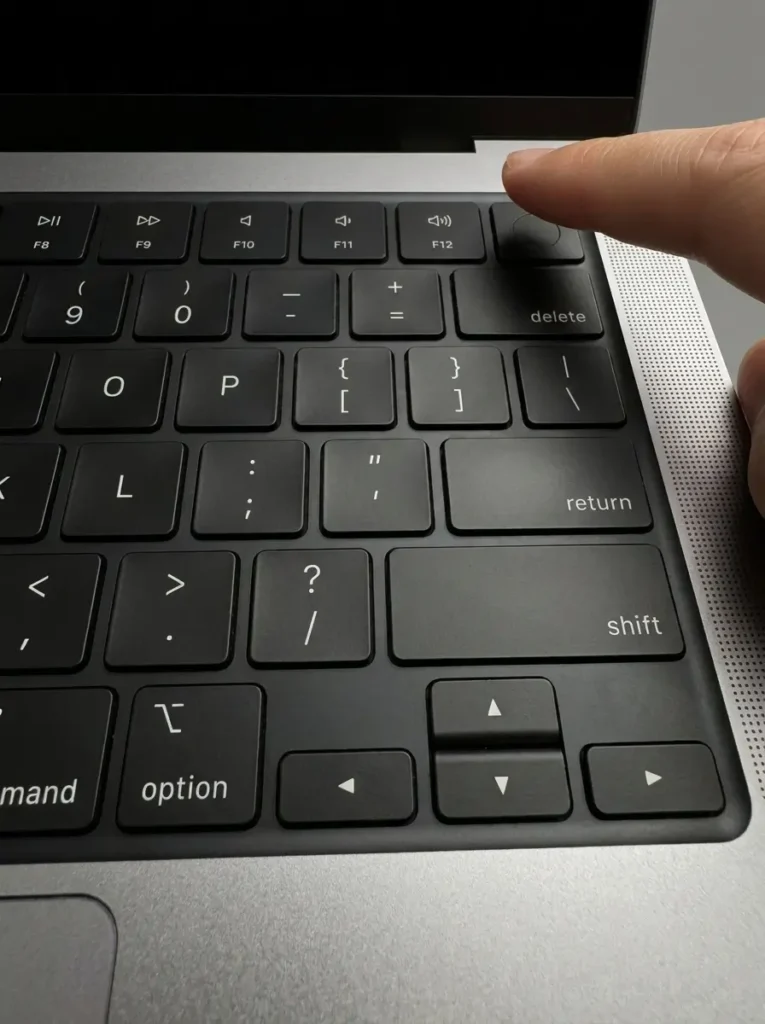
MacBook Touch ID Replacement is rare but it happens to a lot of the MacBooks that comes with Touch ID. From the MacBook Air 13-Inch Intel processor to the 13-Inch and 15-Inch with M1 until the M5 Processor and also the MacBook Pro 13-inch Intel and M1 and M2 processor, 14-Inch and 16-Inch with M1 to M5 Processor, the Touch ID is a important button for us to scan our fingerprint to unlock the mac, perform any file transfer or actions, and also to our Passkey for secure login.
Having a faulty Touch ID handicaps your usage towards your MacBook. The Touch ID is build in which it is serialized and tied to the MacBook’s Logicboard. The good news is, the Touch ID is replaceable, but, only replaceable with Genuine Apple Parts as it requires us the Apple Certified technicians to perform configuration of the Touch ID Button to the MacBook’s Logicboard via Apple Repair system.
Bonus #7 : MacBook Speaker Replacement
Sound coming out crackly, distorted, or only from one side? MacBook speakers usually go after water damage, or simply wear out over the years. Sometimes it’s just debris stuck in the grille, but if the speaker itself is blown, it needs replacing. We open up, check whether it’s the speaker or something deeper on the board, and quote you from there.
Bonus #8 : MacBook Touch Bar Replacement
The Touch Bar on 2016 to 2020 MacBook Pro models is that thin OLED strip above the keyboard. When it goes blank, flickers, freezes, or stops responding to taps, it’s usually the strip or its cable. We’ve handled plenty of these, including ones damaged by spills or pressure. Diagnosis is free, and we’ll tell you straight whether it’s worth fixing for your model.
Searching for MacBook Repair Near You? Discover the areas we cover for Macbook Repair, iMac Repair, iPhone Repair and iPad Repair.
Need assistance right now? Look for Apple repair shops surrounding you.
KissMyMac® Malaysia is Apple Certified Independent Repair Provider specializes in Macbook Repair and Upgrades services in Malaysia with branches spanning from Kuala Lumpur, Petaling Jaya and Seremban. We provide Macbook repair services including MacBook Screen Replacement, battery replacement, keyboard replacements, to MacBook Upgrades like MacBook SSD Upgrade and MacBook RAM Upgrades. Check out our MacBook Repair and Upgrade Services we offer
Frequently Asked Questions (FAQ)
1. Why is my MacBook overheating?
MacBook Overheating can be caused by dust buildup, outdated software, or hardware issues. You can try Clean the fans or seek our professional help for internal cleaning and servicing may help solve the Macbook overheating issue.
2. Why does my Macbook Screen Crack? Or Have Lines?
Normally macbook screen crack are due to objects are being placed accidentally between the screen and keyboard, while closing the screen unknowingly, it causes the screen to crack and subsequently, have lines.
3. What To Do if My Macbook Is Not Charging/ Macbook Won’t Turn On?
Performing a PRAM/NVRAM reset may solve the probelm. PRAM/NVRAM stores system settings like startup disk selection, screen resolution, and time zone. Resetting PRAM/NVRAM can help resolve issues like incorrect date and time, wrong display resolution, or startup problems.
For Macbook / iMac 2015 and Before
1. Shut down your Mac
2. Then turn it on and immediately press and hold these four keys together: Left Option, Left Command, P, and R.
3. Wait till the screen lights up 3 times then release all keys
For Macbook / iMac 2017 and after
1. Shut down your Mac
2. Then turn it on and immediately press and hold these four keys together: Left Option, Left Command, P, and R.
3. Wait till the screen lights up 2 times then release all keys
Written By
I am the KissMyMac® Malaysia Technician, an Apple Certified Technician at KissMyMac with More than 8 Years Of Experience In The Apple Repair Industry. We specialize in Macbook Repair & Upgrade, iMac Repair, iPhone Repair, iPad Repair in KissMyMac. We have dealt with more than 30,000+ Apple repairs throughout our years working in this industry, from a small repair shop to where we are now with 3 branches across Malaysia – KissMyMac Kuala Lumpur, KissMyMac Petaling Jaya, and KissMyMac Seremban